
ElevenReader Review 2026
ElevenReader Review — A digital reader with excellent AI voice quality, audiobook library, and GenFM AI podcast feature
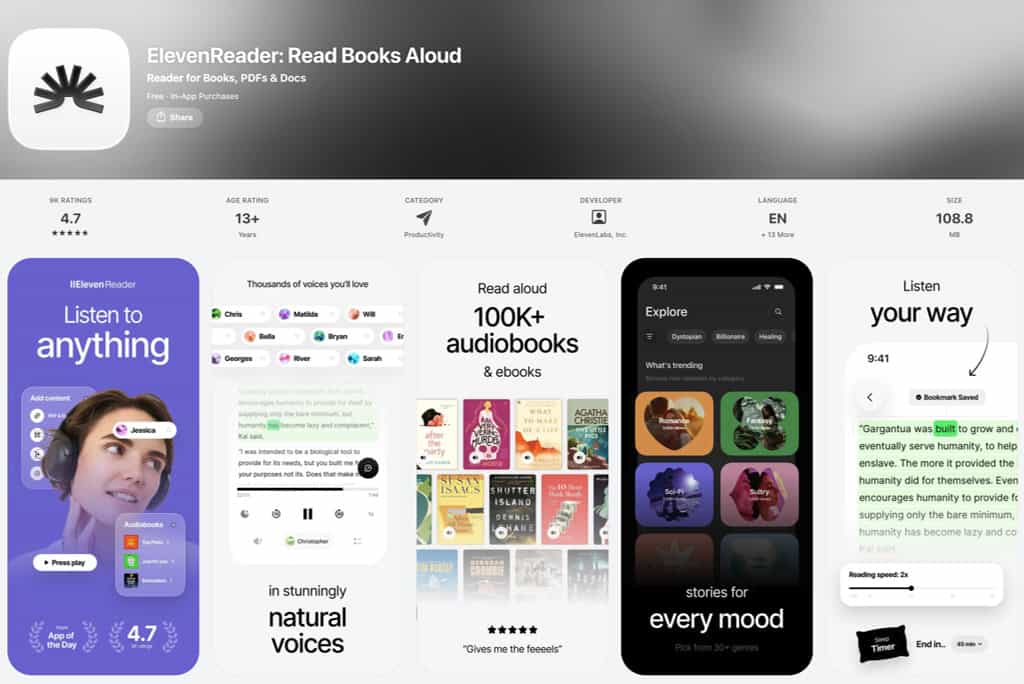
If we are honest, all those fancy text-to-speech apps share a quiet flaw: nobody actually enjoys them. I mean, people use them because they work, not because they feel good. ElevenReader wants to be different — voice quality so close to that of a human narrator that long listening sessions no longer feel like a compromise.
And five million installs and a 4.7-star App Store rating suggest readers noticed.
Behind the app sits ElevenLabs, an AI audio company whose voice technology powers professional dubbing pipelines and broadcast studios worldwide.
Building a consumer reading app was their first move into the everyday market, and it shows in both directions. Voice quality achieves a level that competitors find hard to match. But certain parts of the product still feel like infrastructure waiting for a simpler interface.
This ElevenReader review covers what actually changed with that move: what works for daily reading, what still falls short, and whether the app belongs in a serious reading workflow.
ElevenReader — Overview
ElevenReader is a text-to-speech reading app made by ElevenLabs, a New York-based AI audio company. Before launching ElevenReader, ElevenLabs built its business selling voice synthesis APIs to developers, studios, and publishers — not necessarily consumers.
ElevenReader was their first consumer product and launched publicly in May 2024. A few months later, it went global, with 32 languages supported from day one.
Mobile-first is definitely the UX/UI design philosophy here. iOS and Android are the primary platforms. A Chrome extension covers web content, but so far, no native desktop or web app exists. Mmh, why would someone want to listen to a book while sitting at the desk? Right? Maybe that gap matters more than it might first appear.
Who is ElevenReader for primarily?
Working adults and students processing large volumes of written content — articles, newsletters, research PDFs, nonfiction books — who prefer or need audio delivery. Commuters, people managing visual fatigue, and those with ADHD or dyslexia also represent the most active user base.
Secondary audience
Publishers and authors exploring AI audiobook creation through ElevenReader’s separate publishing tool and its PublishDrive partnership for indie distribution.
Who ElevenReader is NOT for
Speed readers should not get confused here by the word ‘Reader’. Thus, anyone looking for a speed-reading trainer with RSVP mechanics, WPM tracking, or comprehension testing should consider speed-reading apps instead.
ElevenReader converts text to audio — it does not train reading speed. Readers working primarily at a desktop will encounter recurring friction that this app’s current design does not resolve.
ElevenReader highlights at a glance
- AI voice narration using ElevenLabs’ proprietary neural synthesis engine
- 800+ lifelike voices, including custom narrator design via text prompt
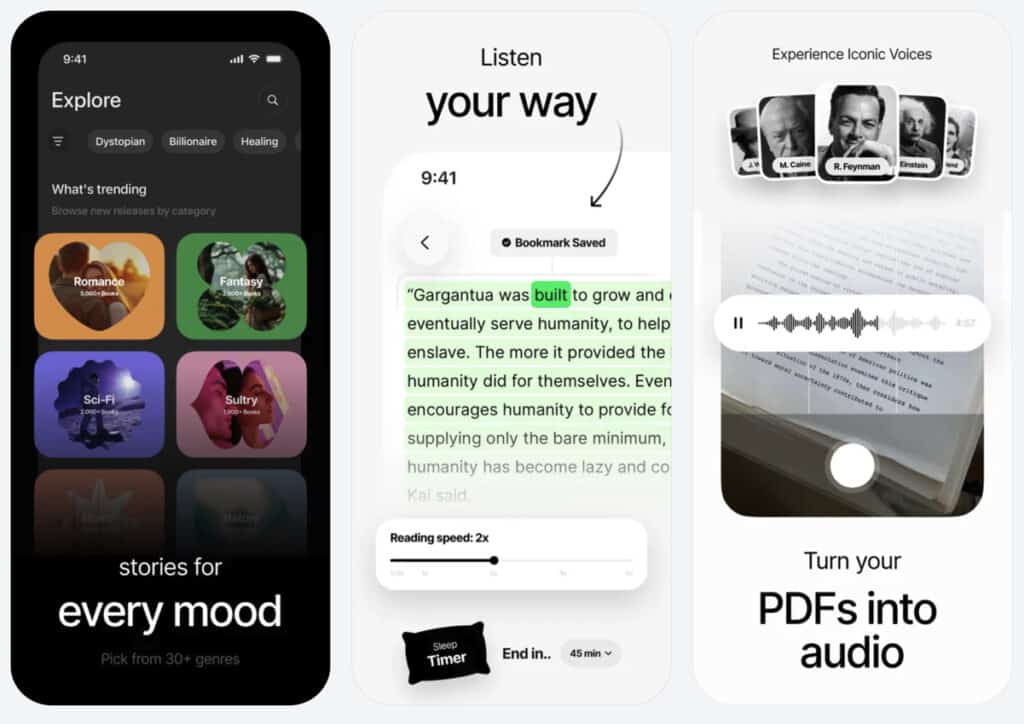
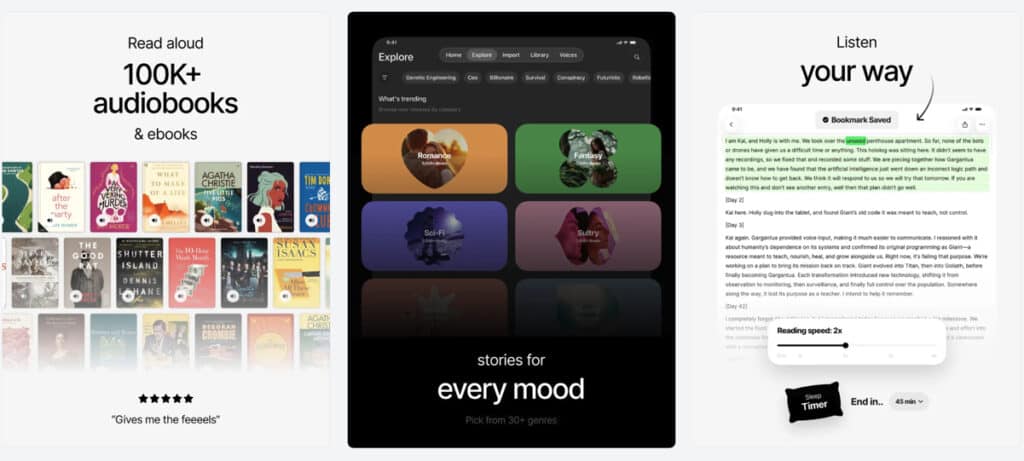
- 100,000+ premium audiobooks (Ultra plan); 20,000+ free titles for all users
- Support for PDFs, EPUBs, articles, newsletters, images, and web content
- GenFM: AI-generated conversational podcasts from uploaded content
- Chrome extension for in-browser reading
- Playback speed up to 4.0x, free for all users
- Offline listening (Ultra plan only, 10 downloads per month)
- 32-language support
ElevenReader — Main Features
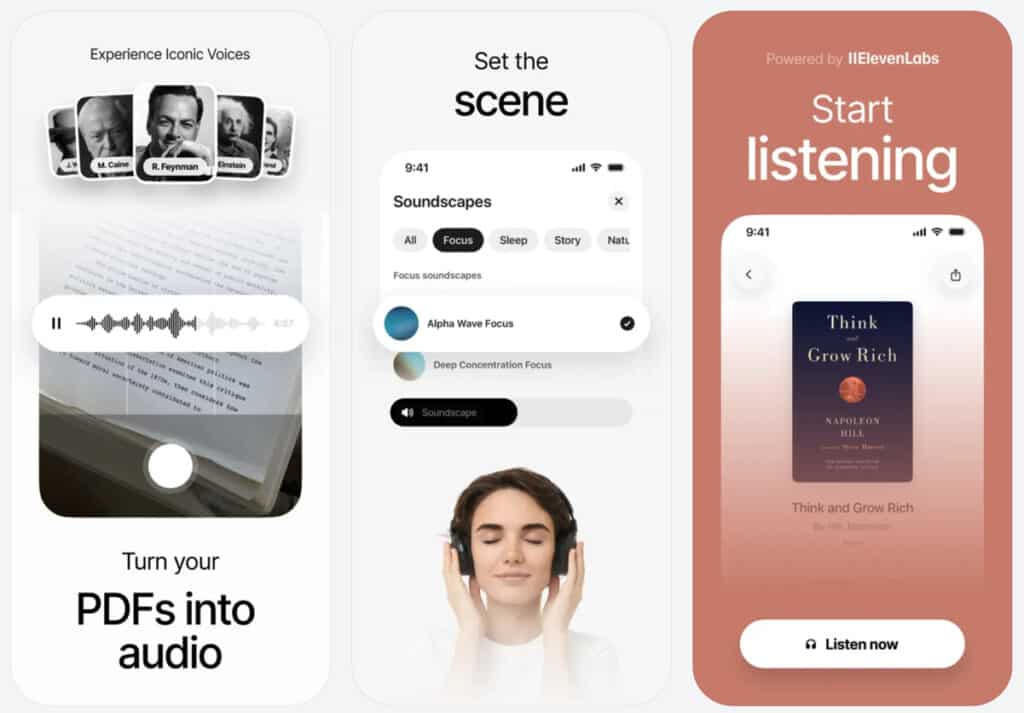
ElevenReader’s feature set is narrower than Speechify or Readwise Reader in some areas. In one area, it is genuinely superior — and knowing which area shapes every other decision here.
1. AI voice quality
Ask a room of regular TTS users whether they enjoy their app of choice. I’m sure you’ll find tolerance and acknowledgment, but not enthusiasm. A slightly robotic cadence, flattened intonation, stress landing in the wrong place: standard delivery across the category, all accepted quietly as the price of listening on the go.
Well, ElevenReader runs on the same voice synthesis engine sold to professional studios, the same technology behind commercial dubbing pipelines.
Thus, what becomes immediately noticeable is prosody: natural rhythm, emphasis, and pacing that make speech feel like speech.
Just picture listening to a long article during a commute and realizing, halfway through, that you haven’t once wished the voice would just stop. Pauses arrive where they should. Emotional register shifts with the text’s tone, within limits.
Cognitive fatigue from unnatural TTS accumulates slowly, then suddenly. Having tested every major TTS tool on the market, I can say that ElevenReader is indeed the first app where that fatigue doesn’t build the same way.
A diverse portfolio of voices adds further depth. Over 800 voices are available, including the Iconic Voices collection of celebrity-licensed narrators. Although celebrity voices are way overrated, in my opinion.
Anyway. Designing a custom narrator from a text prompt is also possible, with options to specify tone, accent, and register. It’s done actually pretty well, so that voice selection becomes a creative decision rather than a browsing problem.
In a nutshell
- Studio-grade prosody distinguishes ElevenReader from every mainstream TTS competitor
- 800+ voices, including licensed celebrity narrators and prompt-designed custom voices
- Natural delivery holds quality at higher playback speeds better than standard TTS engines
2. Supported content formats
PDFs, EPUBs, plain-text documents, and articles shared via the mobile share sheet are all handled natively.
If you want to integrate newsletters, you can do this through an email forwarding address. Forward a newsletter to a dedicated ElevenReader address, and it appears in the app. Or sign up for newsletters with this address instead.
Importing content is more flexible than the app’s PDF-first design suggests. Images can be scanned, text can be pasted directly, and articles can be shared from the mobile share sheet.
Web content is the one exception — reading a page from a laptop requires switching to the Chrome extension, while reading on a phone uses the app. It works, but it is not seamless, and it is worth knowing before you build a habit around it.
In a nutshell
- Email forwarding for newsletters or direct sign-ups
- Image scanning and text paste expand import flexibility meaningfully
- Web reading requires the Chrome extension, separating mobile and desktop experiences
3. GenFM: the AI podcast feature most ElevenReader reviews missed
Pay attention here because this is where ElevenReader’s reputation as a voice-only app with no AI depth starts to fall apart. This is still due to a few (now outdated) ElevenReader reviews that don’t even mention GenFM, the AI podcast feature. However, as you can see, this is likely to change.
GenFM converts uploaded content into conversational AI podcasts featuring multiple AI co-hosts who discuss, contextualize, and debate the material.
Upload a PDF or article, and a multi-host audio conversation around it begins instead of a straight read-aloud. Google NotebookLM’s audio overview feature is the closest comparison, and both products arrived nearly simultaneously.
Free users receive two GenFM episodes per week. Ultra subscribers get 50 per month.
In a nutshell
- GenFM converts uploaded content into multi-host AI podcasts, not just narration
- Free users get two episodes per week; Ultra subscribers get 50 per month
- Positions ElevenReader closer to NotebookLM than to basic TTS tools
4. Audiobook library
One thing this ElevenReader review kept returning to is the library — a combination most competitors so far haven’t fully matched.
This is because ElevenReader includes 20,000+ free titles for all users, with no hourly limits on library listening. Premium plan subscribers unlock 100,000+ premium titles, including recent bestsellers, plus 20 hours per month of premium audiobook access. 20 hours is ok, but power users may hit the ceiling here easily.
ElevenReader also integrates directly with Standard Ebooks, meaning classic titles from Project Gutenberg (Dickens, Woolf, Tolstoy, and Poe) are available inside the app without any import process. For anyone working with or enjoying literary classics, this is a genuinely useful addition.
While competing TTS tools tend to handle either a personal document library or a licensed book catalog — rarely both — ElevenReader handles both in a single interface, at a price below Audible. For heavy readers already paying for a listening service, that combination is worth pausing on.
5. Chrome extension
Activating the Chrome extension converts any web page to audio directly in the browser. Highlight a passage, activate the extension, and narration begins. A full-page reader mode strips navigation and ads before the reading starts.
Unlimited file imports through the extension are free for all users. For web-heavy research workflows, genuinely useful — as long as a Chromium-based browser (Chrome, Brave, Comet) is the browser of choice. Everyone else is simply out.
6. Playback controls
Speed adjustment reaches 4.0x, free for all users. For trained speed-listeners who have built a deliberate practice at 1.5x or 2x, that ceiling matters. ElevenLabs’ voice model handles audio compression more gracefully than standard TTS engines.
Speech stays comprehensible at higher speeds rather than degrading into a mispronounced blur. Bookmarks and a sleep timer are included for all users at no cost, but should be considered standard features anyway.
7. Offline listening
An offline mode is available only on ElevenReader’s Ultra plan. Subscribers get 10 downloads per month, each up to 16 hours long. Audio is generated and cached in advance rather than streamed, so the quality is identical to online listening.
There’s one detail worth flagging before subscribing. The audio files cannot be exported from the app. Downloads are for in-app offline use only. Transfer to other platforms or devices is not possible. The reason is licensing: publishers who provide content to ElevenReader grant streaming access, not file ownership.
For personal documents you upload yourself, the same rule applies within the reader. If you need exportable audio from your own text, ElevenLabs’ separate web platform handles that — but that is a different product entirely.
In a nutshell
- Offline listening requires an Ultra subscription; not available on the free tier
- 10 downloads per month, up to 16 hours each
- Audio cannot be exported; downloads are locked inside the app
8. ElevenReader and the desktop gap
The most consistent user complaint this ElevenReader review encountered is also the most structural: there is no desktop app. Ok, I hear you say, some limitations are just inconveniences. But this one is more structural and has been structural since day one.
ElevenReader is a mobile app by design. A Chrome extension provides partial desktop functionality, but an extension is not an application. No web interface exists for managing a library and listening from a browser. There is no native desktop app for Windows or macOS either.
Imagine spending a morning at a desk working through research PDFs — the exact scenario ElevenReader should serve well. Without a desktop app, the choices are to use the Chrome extension or transfer files to a phone. Both add steps.
Speechify has a web app and a desktop client. Readwise Reader is browser-native. Even NaturalReader runs in a web app.
Reddit threads from mid-2025 confirm this is an active, unresolved user request. ElevenLabs has not published a timeline for a desktop or web app at the time of writing this ElevenReader review. Thus, for desk-anchored readers, this single gap may be disqualifying — not because the mobile experience is poor, but because enough friction quietly erodes a reading habit over weeks.
Reading tip: If you want AI to actually save reading time, start with a focused overview instead of scattered tips. The main AI speed reading guide walks you through my 3‑Step AI Speed Reading Method and shows where tools, AI summaries, and listening apps realistically help.
From there, you can dive into tutorials on AI‑supported reading workflows such as our ChatGPT for speed reading guide — and compare carefully selected AI speed reading apps and text-to-speech apps or AI summarization tools before committing to any subscription.
ElevenReader AI Features and Reading Workflow
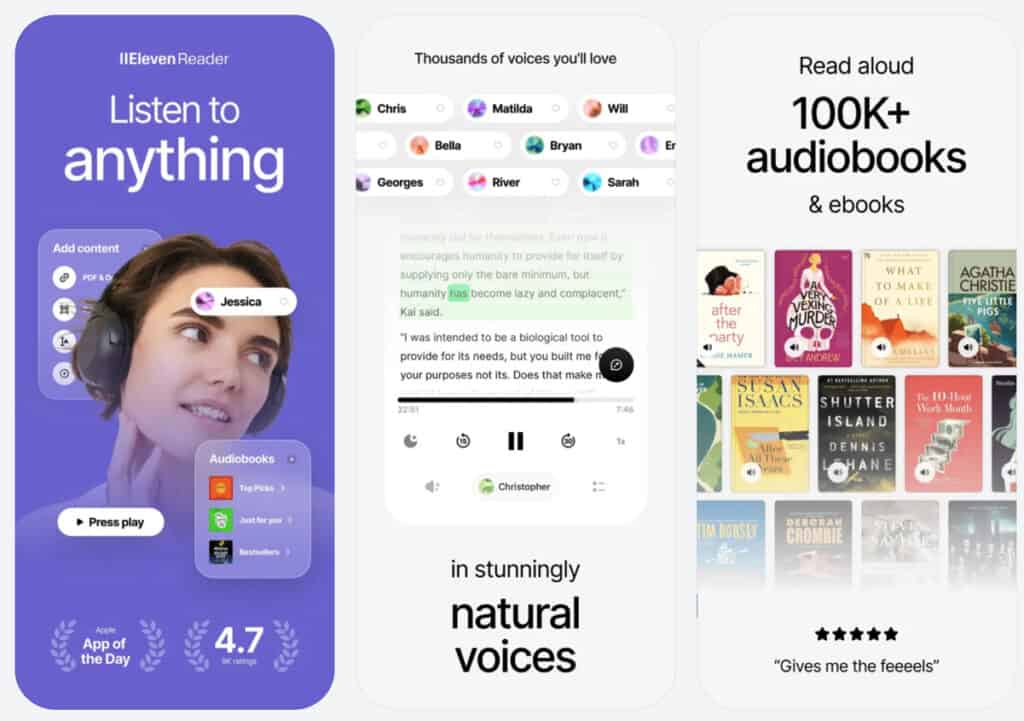
What the AI actually does
Every voice in ElevenReader is generated by ElevenLabs’ proprietary neural TTS engine, powering enterprise products and professional studio pipelines alike. Text is processed, and audio is generated with context-aware prosody: emphasis, pacing, and tonal variation responding to sentence structure and punctuation.
Beyond voice synthesis, GenFM adds a second distinct layer. Content becomes a conversational discussion rather than a recitation alone.
But it is worth being clear about what remains absent: no AI here summarises, highlights key passages, assesses comprehension, or adapts to reading difficulty. AI Intelligence concentrates on the voice layer and the conversational podcast layer, and stops there.
Is the ElevenReader AI genuinely valuable or surface-level?
For the specific problem ElevenReader solves — converting text to natural-sounding audio — there is genuine, measurable value. The app’s voice-quality advantage is both audible and consistent.
Such value is also repeatedly reported by users switching from NaturalReader or standard iOS TTS. Users say that the extended listening sessions feel different. Or, that content gets finished rather than abandoned halfway through.
Analytical depth is probably where ElevenReader still falls short. Listening to something and actually retaining it are two different problems. Readwise Reader, for example, treats both as one: TTS plays the content, highlights capture what matters, and spaced repetition resurfaces those highlights days later until they stick.
None of that retention infrastructure exists in ElevenReader. GenFM is a meaningful addition — a multi-host discussion helps comprehension in the moment. Remembering what you heard a week later is a different challenge, and one that the app leaves entirely to you.
How ElevenReader fits our 3-Step AI Speed Reading Method
Honesty first: ElevenReader fits this AI reading framework partially and specifically. Having worked through the 3-Step AI Speed Reading Method in detail, its role here is rather narrow but still effective to some point.
Tip: Briefly skim our method to get familiar with the terminology used below.
Step 1 uses AI synthesis for triage and reduction — ElevenReader offers nothing in that regard. Step 3 drives active retrieval through AI-assisted questioning — nothing there either. No integration with ChatGPT, Claude, or Anki is built in.
What ElevenReader does contribute, and contributes well, is Step 2: hybrid audio consumption of lower-priority or familiar material.
Our AI reading framework recommends audio consumption at 1.5x–2x speed for supporting content. Precisely here is where the voice quality advantage is most felt.
A realistic workflow: run a Claude or ChatGPT scan first to identify which sections need close attention. Then use ElevenReader as supporting material during a commute or a low-focus window.
GenFM can add a useful variant — converting a dense document into a conversational podcast for first orientation, before close reading begins.
ElevenReader is an exceptional audio layer inside a broader hybrid method. As a standalone reading tool, it quickly becomes apparent that it has gaps. The question, though, is whether ElevenReader ever wants to close it at all. There are enough other AI use cases to be focused on here.
ElevenReader Pricing
Pricing is where my ElevenReader review usually fares better than most published comparisons suggest. That’s because ElevenReader’s pricing was substantially restructured a while ago, with a reported 50% reduction in subscription cost.
Current pricing plans
Always verify current pricing directly at elevenreader.io/pricing before subscribing.
- Free: 10 hours of text-to-audio generation per month; 20,000+ free books with no hourly limits; 2 GenFM episodes per week; bookmarks, sleep timer, 4.0x playback — all without paying
- Ultra: $8.25/month billed annually ($11/month billed monthly); unlimited text-to-audio up to 24 hours per day; 100,000+ premium titles; 20 hours per month of premium audiobook access; 10 offline downloads per month; custom voice creation; priority support
Keep in mind that one-time hour packs are available for users wanting additional generation without committing to a subscription.
The Ultra plan at $8.25/month annually sits below Speechify ($29/month) and Audible ($14.95/month). A single subscription covers both a large licensed audiobook catalog and AI narration of personal documents. No other app in this niche category currently offers that combination at this price.
But there is also a catch, of course. For example, Reddit users in mid-2025 described the pricing structure as confusing, and some called it even deceptive.
The specific concern: “unlimited” in the plan name applies to text-to-audio generation hours, but premium audiobook access is capped at 20 hours per month. Reading the fine print before subscribing is not optional. It is essential to know what you get and the limitations of high-end features.
Library listening hours are unrestricted for free users. Personal document generation is metered. Those are different things, and the distinction matters more than the marketing language suggests.
ElevenReader Review – Pros & Cons
ElevenReader Pros – What works
Voice quality leadership. No mainstream consumer TTS app matches ElevenLabs’ voice synthesis in terms of naturalness and prosody. In my experience, the gap isn’t marginal — it is the difference between a voice comfortable for over two hours and one that generates cognitive strain after twenty minutes. For long-form content, every session compounds that advantage.
Library and personal documents combined. 20,000+ free titles for all users, 100,000+ premium titles on Ultra, and personal document upload in the same interface. Combining both at a price below Audible is genuinely differentiated.
GenFM. ElevenReader reviews still haven’t fully documented this yet, so worth saying plainly: converting a dense PDF into a multi-host discussion creates a real, useful first layer of engagement with complex material, before close reading begins.
Multilingual depth. Thirty-two languages with consistent voice quality across all of them. Competitors either lack this breadth or deliver noticeably degraded quality outside English.
Free tier generosity. Ten hours of monthly text-to-audio generation, 4.0x playback, bookmarks, 20,000+ free books, and 2 GenFM episodes per week — all without paying. A more usable free experience than comparable TTS competitors offer.
Language support. ElevenReader narrates content in 30+ languages and continues to grow. The app interface supports 14 languages, including English, German, French, Spanish, and Portuguese. Menus and settings likely remain in English for many users.
ElevenReader Cons – What falls short
Desktop access is missing. Loudest and most consistent user complaint since launch, still unresolved as of May 2026. A Chrome extension as a workaround is not the same as a solution — and anyone spending serious reading time at a desk will feel this daily.
Exported audio doesn’t exist. Generated audio is locked inside the app. Files cannot be transferred to other platforms or devices—an unusual restriction for a tool positioned for serious readers, quietly limiting flexibility.
Reading analytics are absent. No comprehension tools, no highlight integration, no spaced repetition, no reading speed tracking. Readwise Reader and Speechify build more analytical intelligence around the listening experience.
Android lags behind iOS. Google Play reviews surface more stability and UX friction than App Store reviews. Reddit threads corroborate platform-specific issues. Android users should expect a rougher experience than any headline rating suggests.
Pricing transparency is a work in progress. Library listening hours are unrestricted. Personal document generation hours are metered on the free tier. Reddit sentiment suggests this confusion is not just user error — it is a communication gap built into how plans are presented.
ElevenReader alternatives – How competitors compare
To give this ElevenReader review proper and deeper context, here is how it stacks up against the app’s main alternatives.
| App | Voice quality | Desktop | AI depth | Library | Price |
|---|---|---|---|---|---|
| ElevenReader | Industry-best | Chrome ext. only | Voice + GenFM podcasts | 100K+ premium; 20K+ free | Free; $8.25/mo Ultra (annual) |
| Speechify | Very good | Yes (web + desktop) | Summarisation, AI scanner | Limited | $29/month |
| Voice Dream Reader | Good | macOS available | Limited | None | One-time ~$19.99 |
| NaturalReader | Moderate | Yes (web app) | Basic | None | Free + paid tiers |
| Readwise Reader | Good (via TTS) | Yes (web-native) | Highlights, AI chat, summary | None | ~$7.99/month |
For desktop access or deeper AI reading analytics alongside TTS, Speechify is the more complete platform. If you aim for a one-time purchase with solid macOS parity, Voice Dream Reader remains a strong option.
For readers who prioritize comprehension infrastructure over voice quality, Readwise Reader covers that ground more thoroughly.
In a nutshell
- Pros:
- Best-in-class AI voice quality for extended listening
- 100,000+ premium audiobooks plus personal document upload in one app
- GenFM AI podcast feature converts content into a conversational discussion
- Competitive pricing after restructure; free tier is genuinely usable
- 32-language support with consistent quality
- Cons:
- No native desktop or web app — unresolved since launch
- Audio cannot be exported from the app
- No comprehension tools, highlights, or reading analytics
- Android experience lags behind iOS
ElevenReader Review – Verdict

ElevenReader scores 8.5 out of 10 in our review.
You can probably tell — I quite like the ElevenReader app, despite some of its limitations and structural shortcomings.
Writing this ElevenReader review meant spending several weeks with the app. Thus, I recommend doing the same.
Spend a week with ElevenReader, and you may stop thinking about it as a rather functional TTS app and start understanding what listening to text could actually feel like. Voice quality in ElevenReader sounds better than most other apps. It may also impact what you’re willing to listen to, and for how long.
Since launch, ElevenReader has moved further than most current ElevenReader reviews reflect. A pricing restructuring brought costs down meaningfully. GenFM added a layer of AI engagement that didn’t exist before. The library now exceeds 100,000 premium titles. My 8.5 rating accounts for it all.
What holds it at 8.5 rather than higher is equally specific. Reading primarily at a desk means living with the Chrome extension as a workaround for everything the app could otherwise handle.
Audio cached offline stays inside the app — there is no way around that without a separate tool. I understand why that is, and pricing would certainly be higher if they were to seal a third-party license deal to allow it.
Furthermore, comprehension support, highlights, and reading analytics: none of it exists here. ElevenReader does one thing at a genuinely exceptional level. Readers who need the full surrounding infrastructure will need to wait for one comprehensive app or look elsewhere for other, similarly fragmented solutions.
Who should use ElevenReader?
Readers who consume large volumes of long-form content via audio, primarily on mobile, and find existing TTS apps fatiguing during extended sessions should definitely consider it.
If Speechify or NaturalReader feels tolerable but not comfortable for over an hour of listening, ElevenReader is worth testing on the free tier immediately — the difference in voice quality is audible within minutes. Ultra at $8.25/month, annually, is a credible Audible alternative for anyone who also needs TTS for personal documents.
Who should skip ElevenReader?
Desktop-first readers, anyone needing AI comprehension support alongside TTS, and Android users expecting iOS-level stability. Well, if that is your focus alone. There is then likely more complete functionality at a comparable annual cost in Speechify or Readwise Reader.
If none of those gaps apply to you, this ElevenReader review points clearly in one direction: simply give it a go, there’s a free tier.
| Field | Detail |
|---|---|
| Product Name | ElevenReader |
| Developer | ElevenLabs (Eleven Labs Inc., New York) |
| Platform | iOS, Android, Chrome Extension (no native desktop or web app) |
| Price | Free (10 hrs/month text-to-audio); Ultra $8.25/mo (annual) or $11/mo (monthly) |
| Free Trial | 3-day free trial on Ultra; free tier available indefinitely |
| App Store Rating | 4.7/5 (70,000+ ratings); App Store App of the Day |
| Play Store Rating | Lower than iOS; Android friction noted in user reviews |
| Library | 100,000+ premium titles (Ultra); 20,000+ free titles for all users |
| AI features | Neural voice synthesis; GenFM AI podcast generation; no summarisation or comprehension AI |
| Best for | Mobile-first readers prioritising natural, fatigue-reducing AI voice quality |
| Not for | Desktop-primary readers or those needing AI comprehension tools |
| Audio export | Not available — audio is locked inside the app |
| ElevenReader Review Rating | 8.5/10 |
Have you used the app? Please share your experiences with the app or our ElevenReader review.
Sources
- State of TTS technology — Dong Liang Research
- How to evaluate TTS quality — testdevlab.com
- AI voice quality evaluation metrics and prosody analysis — dubsmart.ai
- NaturalSpeech — human-level TTS benchmark research — speechresearch.github.io
- Benchmarking audio language models in natural speech — arxiv.org
- Voice agent evaluation metrics — MCD, MOSNet, VQM — hamming.ai
- Speech recognition accuracy benchmarks across providers — assemblyai.com
- Standard Ebooks project and public domain catalog — standardebooks.org
Disclosure: This post contains affiliate links to some partners. Speed Reading Lounge may receive a commission for purchases made through these links. It does not add any extra costs. All reviews, opinions, descriptions, and comparisons expressed here are our own.