
Skimming and Scanning Strategies
How to preview, skim, and scan text fast (with AI techniques)

Most people assume that skimming and scanning are what you do when you’re being lazy. The truth is more uncomfortable: skimming is what you do when you’re being strategic.
In an age where AI can process a 300-page book in seconds, the question isn’t whether machines can read faster than you. It’s whether you know what to do with the information they give you.
Skimming and scanning aren’t dying skills. They’re evolving into something more precise. The manual techniques your college professor taught you still work for previewing text. They just work differently now.
When you combine them with AI-assisted reading workflows, you get something neither approach can deliver alone: speed with judgment, scale with nuance, automation with control.
This extensive tutorial will teach you manual and AI previewing strategies.
- You’ll learn how to preview a research paper in ninety seconds using only your eyes and a pen.
- The W-questions framework—Who, Where, What, When, Why—will guide your preview whether you’re using eyes alone or an AI tool.
- You’ll also learn when to let AI map the territory first, then send you in with a specific mission.
- The goal isn’t to choose between human and machine. It’s to know which one to lead with, and when.
For the complete three-pass AI Speed Reading Method that these techniques plug into, see our dedicated AI speed reading guide.
What follows here is the tactical layer: the specific moves that make previewing work, whether you’re scanning with your finger or with an LLM.
Summarize this tutorial prompt: Create a quick-reference guide showing the five skimming and scanning strategies, when to use manual vs AI, and the three key workflows.
What Is Skimming?

Skimming is how you answer the question: Is this worth my time? It’s not reading. It’s reconnaissance.
You move through a text like a drone over unfamiliar terrain, mapping the major features—headings, first sentences, conclusions—without landing anywhere. The goal is to understand structure, tone, and purpose in under two minutes, not to absorb details.
Your brain needs a scaffold before it can hang new information. Skimming builds that scaffold.
When you preview a research paper’s abstract, introduction, and conclusion, you’re not skipping the hard part—you’re giving your working memory a frame to slot details into later. This is why skimming before deep reading improves comprehension; you’ve already constructed the mental map the author intended.
Manual Skimming: Preview the Structure
Before engaging the body text, spend ninety seconds on structural signposts. Read the title twice—once for content, once for tone. Scan all headings and subheadings in sequence; they form the author’s outline without the prose.
Move through the opening paragraph of the introduction and the closing paragraph of the conclusion. As you scan paragraphs, look for thematic sentences. Those are key sentences that summarize entire sections or chapters, often appearing at chapter starts or conclusions.
If an executive summary or abstract exists, read it entirely. This skeleton gives you the argument’s shape, the main claims, and the territory you’ll navigate—without citations, data tables, or tangents.
AI Skimming: Goal-Based Preview
When a sixty-page report lands in your inbox, and you have fifteen minutes to decide if it matters for your work, AI becomes a scouting tool. The technique isn’t outsourcing your reading—it’s directing AI to filter signal from noise based on your specific goal.
Example prompt: “Act as my reading assistant. I’m a product manager preparing for quarterly review. Identify sections about user retention, feature adoption, or competitive positioning. Preview this document and tell me which sections deserve my attention, ranked by relevance, with one sentence explaining why each matters.”
The AI returns a map: “Section 3.2 details Q3 user retention decline—essential read. Appendix B contains competitor analysis—secondary value. Section 4.1 discusses adoption but uses outdated metrics—review only if bandwidth allows.”
You now have an AI-guided preview. But you still manually skim those sections to verify accuracy and catch context the AI might have compressed or misframed.
Tip: For detailed comparisons of summarization tools, see our list of the best AI summarizers.
Manual Skimming vs AI Skimming
Manual previewing trains your pattern recognition across unfamiliar formats. You develop intuition for where insights hide. You catch tone shifts that signal disagreement or uncertainty. You notice what’s absent.
AI excels at scale and speed; manual skimming preserves judgment. The hybrid approach leverages both: AI narrows the field, then you manually skim to verify and contextualize.
Tip: For a complete tutorial on hand pacing, chunking, and other core speed reading strategies, see our how to speed read guide.
What Is Scanning?

Scanning is the opposite problem from skimming. You’re not asking whether something matters. You already know what you’re hunting for.
Scanning is how you find it fast. You move through text with a single question in mind—Where is the price? What year did this happen in? Who conducted the research?—and your eyes ignore everything else. The goal is laser focus, not overview.
Scanning works because humans already skip while reading. Your eyes do it instinctively. The skill is making that skip deliberate, strategic. Readers scan approximately 30% of text even when instructed to read carefully.
The difference between accidental scanning and intentional, purposeful scanning is knowing what you’re skipping and why.
Furthermore, scanning is purposeful hunting guided by the W-questions framework:
- Who (people and names),
- Where (locations),
- What (topics and data),
- When (dates and timeframes),
- Why (reasons and causes).
Knowing which W to hunt helps you ignore noise and find signal.
Manual Scanning: Trigger Word Hunting
Before you scan, define your trigger words—the specific terms that signal what you’re seeking.
If you’re hunting for product pricing in a quarterly report, your triggers are “cost,” “price,” “$,” “investment,” and “fee.” If you’re fact-checking a climate claim, your triggers are specific years, temperature ranges, and researcher names. Write these down or hold them in mind, then direct your eyes to hunt.
Use a pen or your finger (hand pacing) and draw it down the page in a vertical line. This forces your eyes to follow a path while your peripheral vision catches trigger words.
On screen, use your browser’s search function (Control+F or Command+F) to hunt each trigger. Also watch for visual anchors: tables, graphs, highlighted text, bold letters, and conclusion/summary sections—these are shortcuts to key information.
AI Scanning: Question-Driven Extraction
When you’re pulling information across multiple documents or extracting details from text where manual scanning would take an hour, AI handles the mechanical work while you (must) handle verification.
Example AI prompt: “In this document, find every mention of ‘user retention,’ ‘churn rate,’ or ‘engagement metric.’ For each mention, extract the sentence it appears in plus the surrounding paragraph. Format results as: [Section/Page] — [Quote] — [Context note].”
Or for financial work: “Extract all statistics about conversion rates from this marketing report. Include the exact statistic, the page number, and any limitations or caveats mentioned nearby.”
The AI returns structured results. But here’s where scanning with AI requires discipline: verify each extraction against the original.
AI can confidently report context that doesn’t exist. It can pull quotes that sound right but aren’t precise. For information that shapes decisions—financial data, safety protocols, research findings—always cross-check AI results.
Important: The technique asks AI to do the mechanical work, but you (must/will) provide the judgment.
Manual vs AI Scanning: Trade-offs
Manual scanning has one decisive edge: what you see is real. AI might hallucinate. But manual scanning becomes exhausting at scale. If you’re triaging fifty vendor proposals for pricing, your attention fractures. AI scanning scales without fatigue.
The hybrid approach works because it splits the load: use AI to extract candidate passages, then manually verify the ones that actually shape your decision.
Tip: Speed reading courses always cover the topic of skimming and scanning. Keep an eye on the ones that cover AI skimming and scanning strategies too.
How to Skim and Scan? 4 Core Strategies

The techniques that follow are portable. They work on research papers, business reports, emails, books, and legal documents.
They work whether you’re reading on paper or screen. And you can choose whether you use AI or not for your skimming and scanning workflow.
The difference between a reader who can skim and scan effectively and someone who feels lost in text isn’t intelligence; it’s these four habits. Each one targets a specific type of information and trains your eyes to move in a particular way.
Strategy 1: Key Sentence Extraction
Most texts rest on a few load-bearing sentences. Everything else is scaffolding. In skimming, the real work is finding those sentences.
Every paragraph has a topic sentence. Every section has a main claim. Every argument has a thesis. Key sentence extraction is the habit of looking for structure rather than decoration.
Manual Technique
Start with the first sentence of each paragraph. If it doesn’t carry new information, glance at the last. In academic writing, this simple pattern should ideally capture much of the argument.
Look also for thematic sentences—key sentences that contain a summary of an entire section or chapter and give you an overview of key learnings in lengthy material. In business documents, the key line often leads the paragraph.
On screen, let your eyes trace a shallow diagonal: the top left of each paragraph, then the bottom left if needed. A pen or finger as a guide keeps your eyes from drifting into examples and anecdotes when you’re still trying to understand the spine.
Try specific hand-pacing patterns:
- the serpentine style (S-shaped movements across and down the page),
- zigzag patterns (diagonal sweeps),
- or a simple vertical line down the margin.
Experiment to find which pattern trains your eyes fastest
AI Technique
When a document is dense, and you need the central argument quickly, AI can surface potential key sentences, but it still needs your judgment.
Example AI prompt: “Extract the five most important sentences from this document that convey the main argument or findings. For each one, explain in a single line why it matters for understanding the whole. Include the section or page where it appears.”
Or in research mode: “You’re a researcher assessing methodology and limitations. Pull the sentences that explain how data was collected and what constraints the authors acknowledge. Format as: [Sentence] — [Why it matters].”
The AI hands you a shortlist. Then you read each sentence back in its original paragraph. That is where you notice nuance, hedging language, or overconfident claims. Automation proposes; your skimming confirms.
Strategy 2: Name and Number Recognition
Names and numbers are where documents commit to something. If you’re scanning for how many participants a study had, which company was referenced, what the revenue target is, you’re not reading; you’re searching.
Manual Technique
Decide in advance what you’re hunting. Percentages? Currency symbols? Proper names? Dates? Give your brain a specific pattern to watch.
Then move your eyes down the page quickly, not trying to understand every line. Numbers pop visually. Capitalized names form recognizable shapes.
Your visual system can catch these patterns without parsing every word. A finger sliding down the margin keeps your attention moving instead of looping back. This is trained searching, not sloppy reading.
AI Technique
When you need all mentions of a particular entity or figure across many pages, AI can collect them and show you the context around each one.
Example AI prompt: “Find all mentions of ‘Netflix’ in this competitive analysis. For each mention, provide: [Quote or statistic] — [Page or section] — [One sentence describing the context].”
For numbers: “Extract all percentages related to market share or growth from this earnings report. Include: [Percentage] — [What it measures] — [Time period] — [Page number].”
You get a neat list. Then comes the part machines can’t own: checking.
Does that percentage appear exactly as quoted? Is the surrounding paragraph framing it as good news, bad news, or something in between? Data without context is just decoration. Scanning is how you restore the context.
Strategy 3: Trigger Word Identification
Some texts run on specialized vocabulary.
Climate writing leans on phrases like “tipping point” and “feedback loop.” Marketing decks depend on “churn,” “LTV,” “funnel.” Policy documents revolve around “mandate,” “exemption,” or “enforcement.”
These are trigger words—signals that you’re near something important.
Interestingly, trigger-word scanning works faster when you’ve reduced subvocalization. Learn techniques in our stop subvocalization guide.
Manual Technique
Build a small, living list of trigger words for the domains you read most. Keep it in a notebook, a note app, or your head. When you open a new document, mentally switch that list on.
As you skim, your brain starts highlighting those terms automatically. This is one reason experts read faster in their field: they’ve unconsciously built these lists over the years. Doing it deliberately shortens that apprenticeship.
AI Technique
When you’re stepping into a new field, AI can act as a guide to the local vocabulary.
Example AI prompt: “Identify the core concepts and recurring technical terms in this article about supply chain management. List 10–15 terms that appear often and seem central to the argument. For each term, note roughly how often it appears and briefly describe its role in the discussion.”
Now you know what to watch for. The next document you skim in that field will feel less foreign. AI has given you a starter set; skimming does the rest.
Did you know? Trigger words work hand-in-hand with chunking—reading groups of words as units. See our reading groups of words tutorial for details.
Strategy 4: Title and Subheading Analysis
Writers reveal their thinking through structure long before they reveal it through sentences. Titles and subheadings are the visible bones. If you read only those, you can reconstruct a surprising amount of the argument.
Manual Technique
Before diving into the body, read the title, then every heading and subheading in order. Treat it like an outline.
Notice whether the document moves chronologically, by theme, or by argument. Notice which sections look like background and which sound like conclusions. This takes little time and quietly changes how your brain processes the pages that follow. You’re no longer walking into a maze; you’re walking into a map.
AI Technique
When formatting hides the structure, or when headings are inconsistent, AI can redraw the map for you.
Example AI prompt: “Create a hierarchical outline of this document showing all headings, subheadings, and logical section breaks. For each main section, add a one-sentence summary of what it covers. Format as: [Section title] — [Summary].”
What you get is a clean, externalized version of what your manual skimming would have built slowly. From there, you can decide which sections deserve deep reading, which get a light skim, and which you can safely ignore.
Skim and Scan – The Framework: Microwave, Oven, or AI Prep?
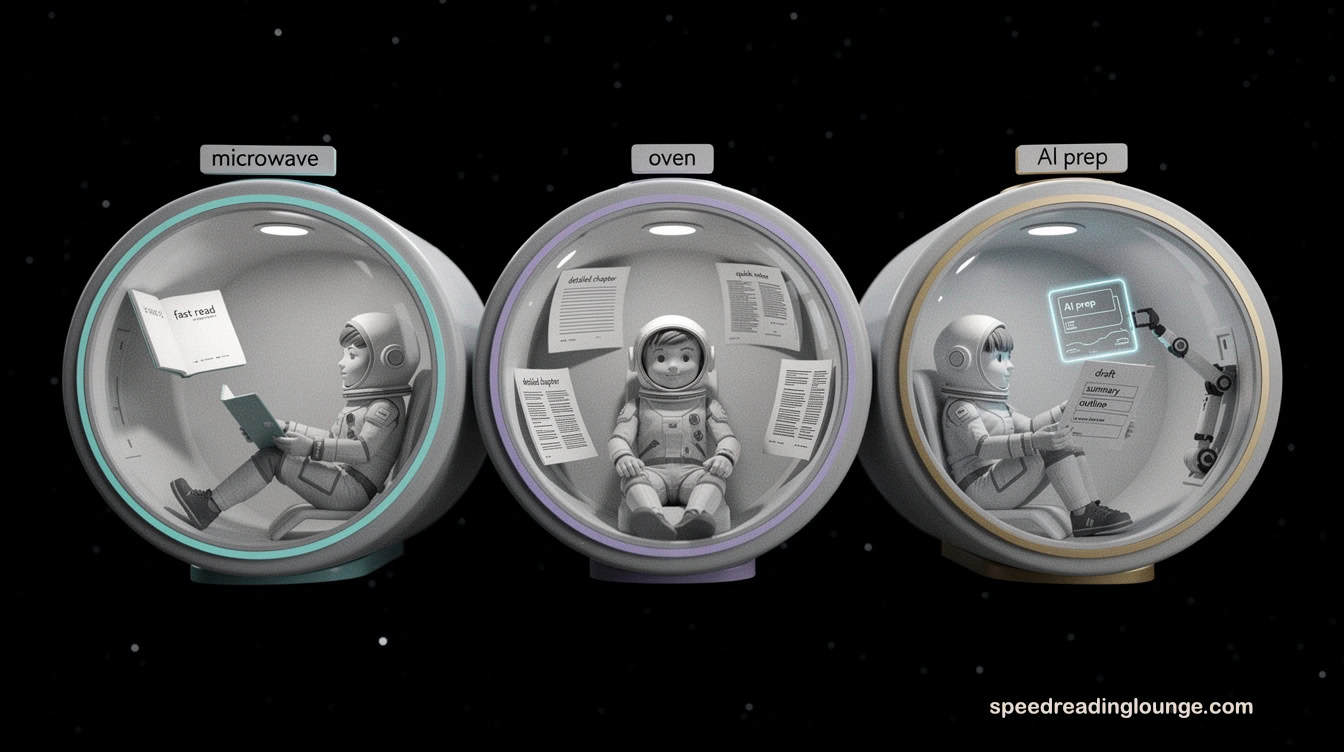
Some texts are snacks. Others are slow meals. Skimming and scanning only make sense when you decide which kind of reading you’re dealing with. The microwave–oven concept captures this distinction, which echoes Mortimer Adler’s multiple levels of reading.
In Adler’s framework, skimming and scanning correspond to elementary and inspectional reading—the quick steps before deeper analytical or syntopical engagement. What changes in the AI age is that a third option appears in between.
Microwave: Fast, Functional Reading
Microwave material is where skimming and scanning do their best work as reading strategies. These are manuals, how‑to guides, technical documentation, policy updates, product specs—anything you read to answer a clear question or solve a concrete problem.
Skimming gives you a quick preview of the structure and main ideas. Scanning then pulls out the exact details you need.
Treating a book or report as microwave material means you stop feeling guilty about skipping stories or long examples.
Remember: books are tools, not sacred objects. Jot notes, underline, highlight.
Experienced readers own their books before starting them. The value lives in instructions, frameworks, and data points, not in the prose.
AI can support this by marking likely relevant sections for your next skimming pass, but the core work still happens between your eyes and the page.
Oven: Slow, Immersive Reading
Oven material asks for something different. Biographies, literary non-fiction, personal essays, narrative business books, and big-idea works reward slower reading.
Skimming and scanning still have a place at the edges: a short preview helps you orient, and targeted scanning later helps you find a passage you vaguely remember.
The main objective here isn’t speed. You read ‘oven‘ books to absorb perspective, language, and story, not just to strip them for information.
Trying to microwave this kind of reading usually leaves you with fragments and no real shift in how you think. AI summarization can flatten an ‘oven‘ book into something efficient but thin. You know what happened, but not how it felt.
AI Prep: When Skimming Starts with a Model
AI prep sits between these two. These are books, research papers, reports, and long-form articles where you’re not sure yet if they belong in ‘microwave‘ or ‘oven‘.
You could commit hours, or you could discover quickly that the content isn’t right for your goals. Instead, you let AI perform an initial preview skim and scan, then you decide how deep to go.
Example AI prompt: “Give me a structured overview of this document. Summarize the main argument, list the key sections, and highlight three ideas that might be most useful for someone interested in [goal]. Suggest whether this text is better treated as quick reference (‘microwave’) or deep reading (‘oven’), and explain why.”
What comes back is not a verdict to obey. It’s a conversation starter with your own judgment. If the AI highlights dense arguments, subtle cases, and layered narratives, you slide the book into the oven category and plan a slower read.
If the AI reveals a straightforward reference manual with reusable checklists, you move it to the microwave pile and plan to use skimming and scanning aggressively.
Over time, this framework becomes a quiet decision engine for your skimming and scanning. Before you start previewing, you ask: Is this ‘microwave’, ‘oven’, or ‘AI prep’?
The answer tells you not only how fast to move, but also how much help to invite from AI and how much attention to reserve for your own eyes.
AI Skimming and Scanning: 3 Practical Workflows

AI becomes genuinely useful when it stops being a novelty and starts behaving like a quiet reading partner.
The goal of these AI previewing workflows is not to let a model do the reading for you, but to give it the kind of tasks that skimming and scanning are already good at. And then keep the decision processes for yourself. Think of these as recipes: you can adjust them, but they give you a starting rhythm.
AI Workflow 1: AI-First Skimming, Human Verification
This workflow suits AI prep material: long reports, whitepapers, or book chapters that might be valuable but haven’t earned a deep read yet.
It answers the question: Is this worth my time?
- Set your goal.
Before uploading or pasting anything, write down why you’re skimming. Are you hunting for arguments, case studies, statistics, or practical frameworks? This becomes your internal brief—the thing that determines whether AI’s suggestions are actually useful. - Ask AI for a goal-based preview.
Paste the text or upload it to your AI reading assistant. This is where you ask for the equivalent of a preview structure scan.
AI Prompt: “You are my AI reading assistant. I’m a [role], and my goal is [goal]. Skim this document and give me: (1) a 5–7 sentence overview of the main argument, (2) a list of the 5 most important sections I should read first, with one sentence each explaining why they matter, and (3) any sections I can safely skim lightly or skip entirely for this goal.” - Manually skim the suggested sections.
Use the key sentence extraction strategy you learned: first sentences, last sentences, headings. Check whether the AI’s ranking matches your sense of the text.
If a section feels thin but was ranked high, mark that. If a section the AI ignored looks rich with detail, trust your eye over the algorithm. - Decide: microwave, oven, or discard.
If the document is mostly checklists and procedures, treat it as microwave reading and plan aggressive skimming and scanning.
If it reveals a layered argument or subtle narrative, move it into the oven pile. Sometimes the most valuable decision is: this isn’t worth more of my time.
AI Workflow 2: Question-Driven AI Scanning for Details
This workflow is for scanning with AI support—when you know exactly what you’re hunting for, but the document is too long to manually scan without losing an hour to inefficiency.
- Define your scanning question.
Turn it concrete: “I need all statistics about customer retention,” or “I want every mention of regulatory constraints,” or “Find all pricing models.” Write it down. This precision matters more than you might think. - Run an AI extraction pass.
This is where you ask AI to do what your trigger-word scanning does manually, but at scale.
AI Prompt:
“You are an AI reading assistant. In this document, find every mention related to [topic or trigger words]. For each instance, provide: (1) the exact quote, (2) the section or page number, and (3) a short note explaining why it matters to someone interested in [goal]. Return results as a numbered list.” - Spot-check and annotate.
Open the original document for at least half of the extracted items. Confirm the quote is accurate. Confirm the surrounding paragraph hasn’t shifted the meaning.
Add your own judgment: “solid data,” “marketing framing,” “weak evidence,” “needs context.” AI does the mechanical scanning; you provide nuance and interpretation. - Use manual scanning for anything that shapes decisions.
For numbers that will appear in a report or presentation, use manual scanning with trigger words as a verification pass.
The combination—AI for breadth and speed, your eyes for precision and judgment—is more reliable than either alone.
Tip: See our best AI summarizer tools that are suitable for this workflow.
AI Workflow 3: Building a Personal AI Skimming Stack
This workflow supports your ongoing AI skimming and scanning practice across many documents over weeks and months.
- Teach AI your preferences.
Start a conversation with your AI reading assistant and establish your criteria once
AI Prompt:
“You are my personal AI reading assistant. When I give you articles or reports, your job is to help me skim and scan efficiently. I care most about: [e.g., practical frameworks, known limitations, real-world examples]. Remember these preferences throughout our conversation.” - Create a reusable preview template.
Design a structure that fits how you actually work.
AI Prompt:
“For any document I send you, use this structure: (1) One-paragraph overview, (2) three key ideas in bullet form, (3) sections to read carefully and why, (4) sections to skim only, (5) one critical question I should keep in mind while reading.” - Combine AI tools with manual habits.
Let AI run the preview. Then you apply your skimming and scanning techniques—key sentences, trigger words, heading analysis—on the sections the AI marked as priority.
Over weeks, you’ll notice something: your sense of what matters in your field gets sharper. The AI prompts you write become more precise. Your reading becomes faster not because AI reads for you, but because you’ve learned to ask better questions.
Tip: As you build your personal reading stack, compare tools in our guide to the best speed reading apps.
These AI skimming and scanning workflows don’t replace the traditional techniques you already use. They sit on top of them.
Skimming and scanning remain the core skills. AI is the exoskeleton you put on when the volume of your reading becomes unreasonable.
The AI workflows work best when you understand that AI is a tool for filtering and highlighting, not for deciding what matters.
As you preview (with or without AI), think of a suitable call-to-action:
- What decision do I need to make?
- What will I do with this information?
Ingraining the learning immediately into your work or life is where skimming and scanning become powerful habits.
Skimming and Scanning Exercises (Manual & AI)

These exercises are designed to build muscle memory. Do them in order over a week or two. Each one isolates a specific skill before combining them.
Exercise 1: Manual Structure Preview (Microwave Material)
Find a how-to guide, technical manual, or business report you’ve been meaning to read but haven’t started. You have five minutes.
What to do: Read only the title, every heading and subheading in order, the first paragraph of the introduction, and the final paragraph of the conclusion. Nothing else. Time yourself. After five minutes, close the document.
What you’re practicing: Understanding a text’s skeleton without reading its details. This is skimming for structure—the foundation of everything else.
Reflection: Write down three things you now know about this document’s argument or purpose. Based only on this preview, could you decide whether to read it deeply? That decision is what skimming actually trains you to make.
For additional manual-only practice, repeat this exercise with different document types:
- scan for key sentences in a second document,
- hunt for names and numbers in a third,
- identify trigger words and thematic sentences in a fourth, and
- treat a fifth as a tool by marking it up with notes and underlining.
Each repetition strengthens your pattern recognition without relying on AI assistance.
Exercise 2: Trigger Word Scanning (Manual)
Take a document related to your work or interests—an article, report, or email thread. Choose one specific thing you’re hunting: a number, a name, a concept, or a date.
What to do: Set a timer for three minutes. Scan the document using your finger or pen, watching only for your trigger word. Don’t read sentences; watch for the pattern. How many instances did you find? Did you miss any?
What you’re practicing: Training your eyes to hunt rather than read. This is scanning in its raw form—speed with focus.
Reflection: Compare your manual scan against a browser search (Control+F or Command+F) for the same trigger. Did you find the same count? Where did your eye slip, and why? Speed without accuracy is just skipping.
Exercise 3: AI-Assisted Preview (AI Prep Material)
Find a book, whitepaper, or long article that genuinely interests you but feels like a serious time commitment.
What to do: Copy a section (introduction plus first chapter, or the first 20% of text) into your AI reading assistant.
Use this AI prompt: “You are my reading assistant. I’m trying to decide if I should read this deeply. Give me: (1) a one-paragraph summary, (2) the three main ideas, (3) whether this feels like ‘microwave’ quick reference or ‘oven’ deep reading, with your reasoning.”
Read the AI’s response. Then manually skim that same section using the techniques from Exercise 1. Did the AI’s assessment match your own sense of the material?
What you’re practicing: Using AI reading as a preview tool while maintaining your own critical judgment. This is skimming with AI assistance.
Reflection: Where did the AI help most? Did it catch something your eye would have missed? Where did it oversimplify or miss nuance? This tells you what AI excels at and where your eyes remain essential.
Exercise 4: Question-Driven AI Scanning
Find a document with data you actually need—a financial report, a research paper, a policy document, anything with concrete information you’re hunting.
What to do: Write down exactly what you’re searching for. Be specific. Then paste the document into your AI assistant and use this AI prompt:
“Find all mentions of [your search term]. For each mention, provide: (1) the exact quote, (2) the section or page number, and (3) one sentence explaining why it might matter.”
Now manually verify at least five of the AI’s results by checking them in the original document.
What you’re practicing: Letting AI do the mechanical work of scanning at scale while you verify and interpret. This is the hybrid approach that combines speed with judgment.
Reflection: Did the AI’s extractions match the original text exactly? Did any quotes feel taken out of context? Did the AI miss important nuances? This exercise shows you exactly where AI scanning needs human verification to be trustworthy.
Exercise 5: Full Hybrid Workflow
Take a document you’ve never seen before—something that could be either microwave or oven material. This is your real-world test.
What to do:
- Use AI for an initial preview (using Workflow 1 from the previous section).
- Manually skim the sections the AI flagged as priority (using key sentence extraction).
- Decide: Is this microwave, oven, or not worth your time?
- If you continue, use manual scanning for any specific information you need.
Set a timer for twenty minutes total.
What you’re practicing: The full loop of skimming and scanning—AI for orientation, manual techniques for judgment, deciding how deep your engagement needs to go.
Reflection: How much did you genuinely understand in twenty minutes? How confident are you in your decision about whether this document matters to you? That confidence level is the real measure of whether these skills are becoming automatic.
Why These Exercises Matter
You don’t become a faster, smarter reader from knowing techniques. You become one by doing them repeatedly until they feel natural.
The exercises are short on purpose—they fit into the time you actually have. The goal is consistent practice over weeks, not grinding hours. Ten minutes of focused work beats casual reading every time.
Skimming and Scanning – Summary, Conclusion

Skimming and scanning aren’t speed reading. They’re decision-making skills. They’re how you decide what deserves your attention and how you extract what matters when time is limited. In a world drowning in text, these two techniques are more essential than ever—not less.
The traditional methods still work. Preview structure by reading headings. Hunt trigger words with your finger. Extract key sentences from the first and last lines.
These habits train your attention in ways that feel invisible until you notice you’ve processed a hundred pages in an afternoon without losing comprehension. Manual skimming and scanning teach your brain to recognize patterns, ignore noise, and move with intention.
But AI has changed the scale of what’s possible.
You can now ask an LLM like ChatGPT, Claude, or Perplexity to do the initial pass—to map the territory before you set foot in it. You can ask it to extract all mentions of a specific data point, then verify the results yourself.
You can use AI as a preview layer that narrows what you need to manually skim, which turns a two-hour project into twenty minutes. The key is understanding that AI doesn’t replace manual skimming and scanning. It extends them.
The microwave-oven-AI prep framework gives you a decision structure that actually works. Before you open a document, ask: What kind of reading is this?
If it’s functional and procedural, microwave it—aggressive skimming and scanning, let AI accelerate if needed. If it’s layered and narrative, treat it as oven material and slow down. If you’re unsure, use AI to preview first, then decide. This single question shapes everything that follows.
The hybrid workflows show you how to execute this. AI-first skimming with human verification. Question-driven AI scanning with spot-checking. A personal reading stack where AI learns your preferences while your own eye gets sharper.
None of this works if you think AI is a replacement. All of it works when you think of AI as a partner that handles specific mechanical tasks while you keep the judgment.
Overall, skimming and scanning are tools for managing information overload, not for skipping important work. They’re how you stay in control of your reading instead of letting every document demand the same amount of time.
When you combine manual technique with AI assistance, when you know the difference between microwave and oven material, when you practice until it’s automatic—that’s when reading stops being something that happens to you and becomes something you direct.
The next step is to understand how skimming and scanning fit into a complete reading strategy. These micro-skills are the foundational building blocks. This guide shows you how to stack them into a system.
See our AI speed reading guide for the complete three-step AI Speed Reading Method and how these skimming and scanning techniques plug into a macro-level workflow for processing information at volume.
Remember: the real power of skimming and scanning isn’t speed—it’s control. It’s how you decide what deserves your attention, extract value without reading everything, and make immediate decisions based on what you learn.
Skimming & Scanning – Manual Best Practices
- Read the title, table of contents, and section headings before the body text.
- Preview the introduction, conclusion, and any executive summary or abstract.
- Extract key sentences from the first and last sentences of paragraphs.
- Scan for names, numbers, and trigger words using your finger or pen.
- Skim images, graphs, illustrations, and highlighted information for visual anchors.
- Take brief notes to summarize key ideas and connect them to your goal.
- Answer clarifying questions: Who, What, Where, When, Why, How.
- Use a timer for skimming and scanning—90 seconds for preview, 5–15 minutes for full skim.
- After manual skimming, decide: Is this ‘microwave’, ‘oven’, or worth abandoning?
- Apply what you learn immediately or mark it for later reference.
AI Skimming & AI Scanning – Best Practices
- Define your reading goal and search intent before using AI assistance.
- Use AI for initial preview and structure mapping of long documents.
- Ask AI to extract key sentences and main ideas with page references.
- Use AI to hunt names, numbers, and trigger words across multiple pages or documents.
- Ask AI to analyze images, graphs, and data visualizations and explain their significance.
- Have AI generate structured notes and summaries aligned with your specific goal.
- Ask AI clarifying questions: what does this mean, what are the limitations, what’s missing?
- Set time boundaries—AI preview should take 5 minutes, verification should take 10–20 minutes.
- After AI-assisted skimming, manually verify key findings before making decisions.
Hybrid Skimming & Scanning – Manual + AI Best Practices
- Start with your reading goal and decide if you need breadth (microwave) or depth (oven).
- Use AI for rapid preview and orientation; use manual skimming to verify and contextualize.
- Let AI identify key sentences; manually read them in full paragraph context.
- Use AI to scan for data points; manually spot-check critical numbers and quotes.
- Combine AI structure analysis with manual headline reading for a complete picture.
- Take notes from both AI summaries and manual reading to cross-check understanding.
- Ask yourself clarifying questions after both AI and manual passes.
- Set time limits: AI preview (5 min) + manual skim (10–15 min) + decision (5 min).
- After hybrid skimming, decide the depth of engagement and what to read next.
- Practice hybrid workflows weekly to build intuition for when each approach works best.
FAQs: Skimming and Scanning With and Without AI
Is AI skimming better than manual skimming for comprehension?
No. They’re different tools. AI skimming gives you speed and scale, but manual skimming trains your pattern recognition and judgment in ways no algorithm can replicate. AI can preview a document in seconds, but it might miss tone shifts, hedging language, or subtle arguments that reshape meaning. Manual skimming builds your ability to recognize structure across different fields and contexts. The hybrid approach—AI for preview, manual for verification—gives you both speed and depth. Neither is universally better; they solve different versions of the same problem.
What are the best AI prompts for scanning research papers?
The most effective prompts are specific and goal-driven. For methods sections: “Extract all sentences that describe data collection procedures, sample size, and statistical methods. Include page numbers.” For limitations: “Find every mention of study limitations, constraints, or caveats. Provide the quote and surrounding context.” For results: “Pull all statistics about [specific outcome] with exact numbers and confidence intervals.” The key is telling AI exactly what pattern to hunt, then verifying its findings manually against the original text. Vague prompts get vague results.
Can ChatGPT help me skim books faster?
Yes, but not the way you might think. ChatGPT can preview a book’s structure and main ideas, but it can’t skim the way your eyes can. Use it for the first pass: “Summarize this book’s main argument, list key chapters, and suggest whether it’s microwave (quick reference) or oven (deep reading) material.” Then manually skim the sections the AI flags as important. ChatGPT gives you a map; your eyes still need to walk the territory to catch nuance, tone, and what the author left unsaid. This is the AI reading workflow described in this tutorial.
How do I avoid AI hallucinations when scanning documents?
Always verify AI extractions against the original text. For critical data, spot-check at least half of what the model returns. Look for quotes that sound plausible but aren’t exact, or context that seems reasonable but wasn’t in the source. The technique is simple: AI does the mechanical scanning, you do the judgment. If a number will appear in a decision or report, use manual scanning with trigger words as a final verification pass. AI is fast; your eyes are accurate. This is why the hybrid scanning approach works better than either alone.
What’s the difference between skimming and AI summarization?
Skimming is active reading—you’re deciding what matters as you move through text. AI summarization is passive—the model decides what’s important and compresses it for you. Skimming builds your judgment and pattern recognition. Summarization gives you efficiency but can flatten nuance, miss edge cases, and inject the model’s biases into what matters. Use summarization for quick orientation and preview, but skim manually to verify and contextualize. The difference is control: you directing your reading, or an algorithm directing it for you.
When should I use manual scanning vs AI scanning?
Use manual scanning when accuracy is non-negotiable—financial data, safety protocols, research findings, legal language. Use AI scanning when you’re hunting across multiple documents or extracting dozens of instances of something that would eat a full day manually. The hybrid approach works best: AI finds candidates, you verify the ones that actually shape your decisions. Manual scanning trains your eye and builds pattern recognition. AI scanning scales your reach. Neither replaces the other; they’re strongest together.
Are AI reading tools worth the cost for skimming?
If you regularly process more than 50 pages of text per week, AI tools can save enough time to justify subscription costs. The value isn’t in replacing your skimming and scanning—it’s in narrowing what you need to read deeply. A $20/month subscription pays for itself if it saves two hours of manual scanning or helps you avoid reading documents that don’t matter. Start with free tiers of ChatGPT or Claude to test the workflow before committing money. The payoff depends on your reading volume and how much time you’re burning on irrelevant material.
How can I practice skimming and scanning with AI assistance?
Start with the five exercises in this tutorial. For Exercises 3 and 4, use AI as described, but always manually verify results. Build a personal prompt template that fits your specific reading goals and domain. Practice the hybrid workflow weekly: AI preview, manual skim, decide how deep to go. Over time, your prompts sharpen, and your manual techniques accelerate. The goal isn’t to let AI read for you—it’s to use AI to make your own skimming and scanning more strategic and efficient.
Should I use hand pacing (finger/pen scanning) or digital search for scanning?
Hand pacing trains your eyes and pattern recognition—useful when reading print or when you need to notice context around data. Digital search (Control+F or Command+F) is faster for finding exact matches in long documents. For critical information, use both: digital search to locate candidates, then hand pacing to verify and read the surrounding context. The combination is more reliable than either alone
Sources and Credits
- Foundational Research on Reading Strategies
How to Read a Book — Mortimer Adler’s Framework on Inspectional Reading (Farnam Street)
- Academic Studies on Skimming & Scanning Effectiveness
The Effectiveness of Skimming and Scanning Strategies in Improving Comprehension — 2024 Systematic Literature Review (Journal VISA)
- The Effect of Skimming and Scanning on Reading Speed & Comprehension — 2018 Quasi-Experimental Study with 54 University Students (Journal Register IAIN Salatiga)
- Reading in Digital Environments
Effective Reading Strategies for Online Text — University of Southampton Study Skills Guide (University Library)
- How to Read a Technical Article Efficiently — Steve McConnell’s Strategy Guide (Free PDF)
- University-Level Reading Frameworks
Success in Academic Reading and Writing: Reading Strategies Chapter — University of Cincinnati Open Textbook (Open Educational Resource)
- Reading Strategies at the University of Nottingham — Practical Toolkit for Students
Enjoy learning! Let us know about your experiences.
Please share this post!