
Readwise Reader Review 2026
Readwise Reader — Read it Later app for better reading workflows
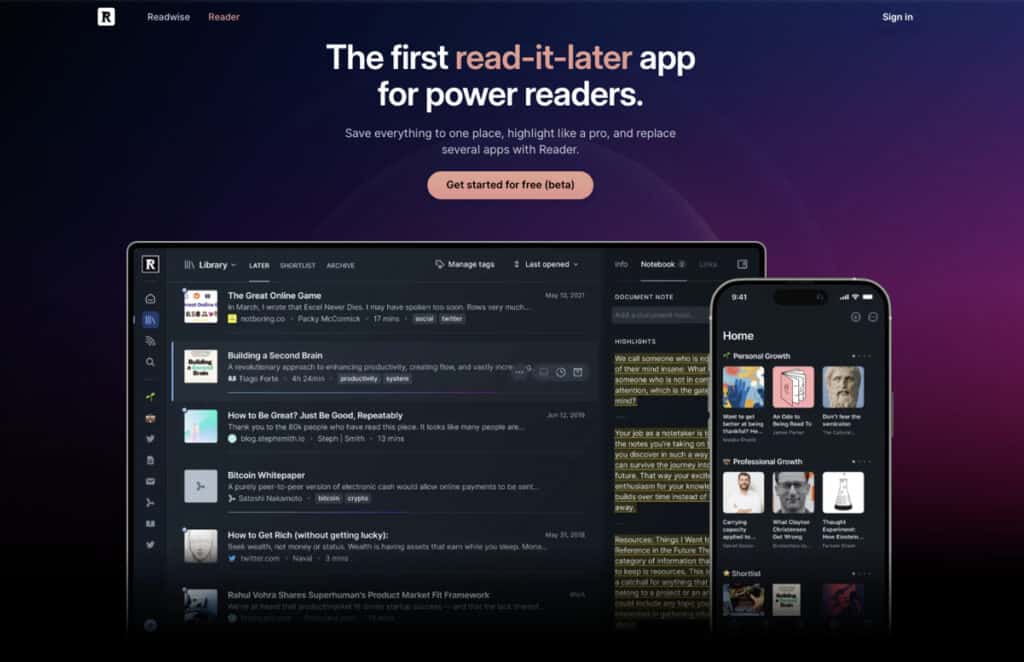
The well-known and popular Readwise Reader app captures every article, PDF, and newsletter you encounter — then feeds your highlights into a spaced repetition system that resurfaces them days and weeks later.
Two former tech workers built it after noticing the same pattern: people read constantly, remember almost nothing, and do nothing about that gap. Most read-it-later apps indeed accept that gap as normal.
Readwise Reader, or just Reader, treats it as the entire problem. The catch is that the spaced-repetition layer only activates on the Full plan, which is what most first-time visitors miss when they land on the pricing page.
By the end of this Readwise Reader review, you’ll know exactly what each tier delivers, whether Ghostreader AI — Reader’s built-in AI assistant — justifies the subscription, and who should close the tab and stick with a free alternative.
Readwise Reader — Overview

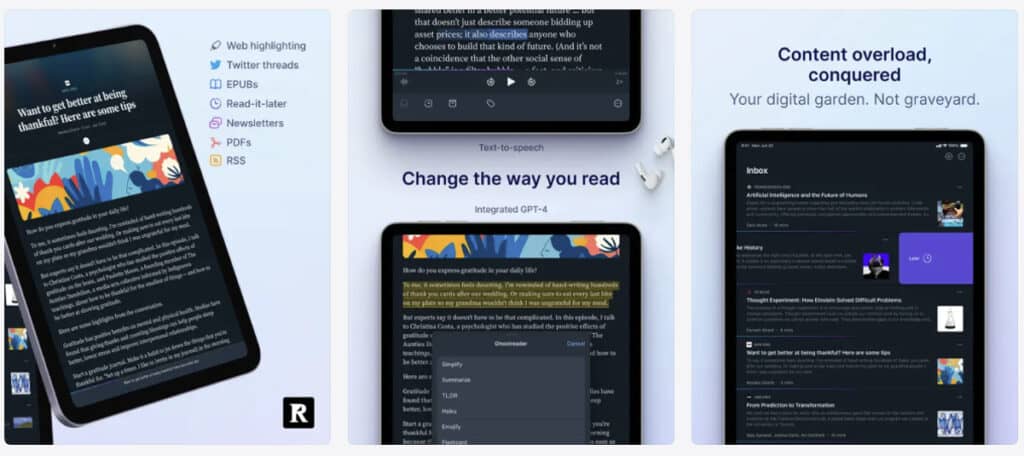
In a nutshell, Readwise Reader is a read-it-later app — a digital place to send articles, PDFs, newsletters, EPUBs, RSS feeds, and YouTube content so you can read them later, annotated and organized.
It was built by Readwise Inc., whose earlier product — a daily highlight review tool that pulls from Kindle, iBooks, and other sources — long predates Reader. That earlier tool is what powers Readwise Reader’s retention layer.
The two apps share a database: highlights you make inside Readwise Reader automatically appear in the Readwise daily review system, ready to be surfaced through spaced repetition. It is a bit confusing, I know, but stay with me.
Why that matters. Readwise Reader is not just a bookmarking tool. It is the reading and annotation interface for a broader knowledge retention system.
Used in isolation, it is a very capable read-it-later app. Used as designed — with the daily review habit — Readwise Reader becomes something qualitatively different from Pocket, Instapaper, or any free-tier competitor.
Readwise Reader is best for knowledge workers, researchers, writers, students, and heavy information consumers who read to learn, not just to consume.
Readwise Reader is not for casual readers who bookmark articles and rarely return to them, or anyone who finds the concept of a daily review habit more appealing in theory than in practice.
Pricing: Readwise Reader is available on the Readwise Full plan for $9.99/month, billed annually, and includes access to both apps.
Readwise Reader’s main capabilities at a glance:
- Web article saving via browser extension or share sheet
- PDF and EPUB import with full annotation support
- RSS reader (native, full replacement for Feedly-class tools)
- Email newsletter inbox (forward newsletters directly into Reader)
- YouTube transcript saving and highlighting
- Color-coded, tagged, nested highlights with note attachments
- Ghostreader AI layer (chat interface, summarization, Q&A, flashcard generation, citation links)
- AI text-to-speech technology for any document
- Full-text search across your entire library
- Cross-platform sync: web, iOS, Android, browser extension
- Automatic highlight sync to Readwise for daily spaced repetition review
Readwise Reader — Core Features
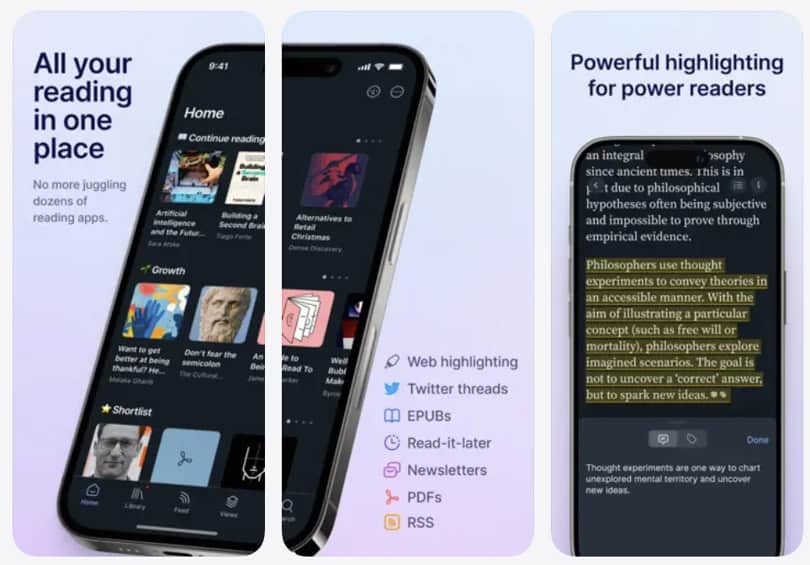
The reason Readwise Reader has built a serious following in the personal knowledge management community isn’t its UI, which is functional rather than beautiful. It’s the breadth of content it handles without degrading. That breadth is rarer than it sounds.
1. Web articles and the browser extension
Saving a web article through the Reader extension strips away ads, sidebars, and comment sections. What remains is a clean reading view. Parsing is based on major publications. Paywalled content is more complicated, though. Readwise Reader saves what you can already see, nothing more. I’m sorry to disappoint you here.
The extension runs on Chrome, Firefox, Safari, and Edge. On both iOS and Android, the share sheet integration is fast enough that saving an article from another app takes under two seconds.
2. PDF annotation
PDFs inside Reader render cleanly for text-heavy documents. Scanned PDFs — the kind where text exists as an image rather than selectable characters — are a different story.
Annotation on scanned documents is either unavailable or limited, depending on the file. Academic papers in standard PDF format work well. Old or image-heavy documents are hit-or-miss. I’d strongly recommend testing your specific PDF workflow during the trial before committing.
3. EPUB support
EPUB import is an underused feature that quietly separates Readwise Reader from most competitors. You can import a file directly, read it inside Reader with full annotation support, and have your highlights sync automatically into the daily review system.
This makes Readwise Reader a functional e-reader for DRM-free ebooks, long-form reports, and anything else distributed in EPUB format. It certainly does not replace a dedicated e-reader for DRM-protected content, but for documents you own outright, it works reliably.
4. RSS as a first-class feature
The Readwise Reader app includes a fully functional RSS reader that most users either overlook or undervalue. Feeds are managed inside the same inbox as articles and newsletters. There is no separate RSS interface — everything flows into one queue.
For heavy information consumers, that matters. It eliminates the need for a subscription to Feedly, Inoreader, or any comparable tool. The RSS reader is not a stripped-down bonus and is genuinely usable, with filtering options and reading-position tracking.
For our speed reading audience here, this consolidation is a real total-cost argument.
5. YouTube transcript highlighting
This is the feature that stops people mid-demo. Readwise Reader can save a YouTube video, render its auto-generated transcript, and let you highlight passages from that transcript. Those highlights then sync automatically into the daily review queue, exactly like any other annotation.
There is no close equivalent in Pocket, Matter, or Instapaper. For anyone who learns from YouTube lectures, talks, or documentary-style content, the ability to treat video transcripts as readable, annotatable documents is genuinely novel.
The accuracy, however, depends on YouTube’s auto-captioning. For spoken English, it is reliable enough to be practically useful.
Readwise Reader feature at a glance:
- Web saving is fast and reliable on most standard publications
- PDFs work well for text-selectable documents; scanned files are inconsistent
- EPUB import enables genuine long-form book reading inside Reader
- RSS integration is full-featured, not a stripped-down bonus
- YouTube transcript highlighting is the most striking capability in the product
Reading tip: If you want AI to actually save reading time, start with a focused overview instead of scattered tips. The main AI speed reading guide walks you through my 3‑Step AI Speed Reading Method and shows where tools, AI summaries, and listening apps realistically help.
From there, you can dive into tutorials on AI‑supported reading workflows such as our ChatGPT for speed reading guide — and compare carefully selected AI speed reading apps and text-to-speech apps or AI summarization tools before committing to any subscription.
Readwise Reader — Annotation System and Library Organization
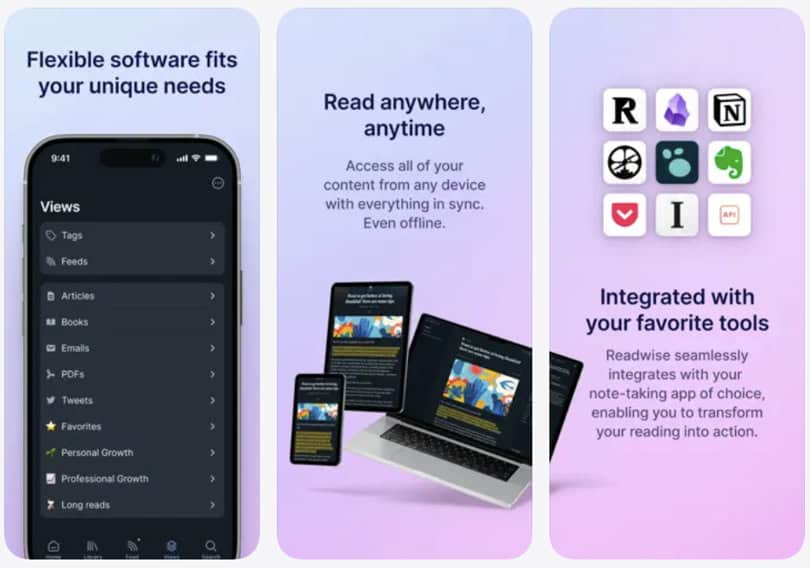
The annotation layer is where Readwise Reader’s philosophy becomes visible. Most read-it-later apps treat highlighting as an afterthought, a light-touch feature for passive readers who occasionally want to mark something up.
Readwise Reader is built around the assumption that annotation is the point, which changes the entire architecture.
Color-coded highlights with semantic tags
Highlights in Readwise Reader can be assigned one of four colors and tagged in the same gesture. A note can be attached to any highlight, inline, without interrupting the reading flow.
This sounds incremental until you realize what it enables at scale. I’ve used Reader across hundreds of documents, and its ability to filter highlights by color, tag, document type, or domain is transformative.
Being able to retrieve a specific passage from six months ago in under ten seconds is what makes researchers and writers stop treating it as just another bookmarking tool.
Nested highlights and note attachments
A highlight in Readwise Reader can contain a note, your own commentary, a question, or a connection to another idea. That note travels with the highlight into the daily review queue, meaning your thinking at the moment of reading is preserved alongside the original passage.
Certainly, other apps allow notes. But only a few make the note feel like a genuine part of the annotation rather than an afterthought field.
Library filters and document management
Readwise Reader’s filtering system is unusually powerful for the category. Documents can be filtered by reading status (inbox, later, archive, shortlist), document type (article, PDF, EPUB, tweet, video, feed), tag, domain, highlight color, and reading position.
At small library sizes, this feels like overkill. At the scale of a serious reader’s inbox — hundreds of saved items accumulated over months — it is the difference between a library and a pile.
The Pocket app stops being useful at scale. In comparison, Readwise Reader is designed to grow with your reading habits rather than collapse under them.
Reader’s annotation system at a glance:
- Four-color highlight system with tags enables semantic organization at scale
- Notes attach to highlights and carry into the spaced repetition review
- Filtering depth is the highest in the category for this price point
- Library organization rewards consistency — benefits compound over time
Reading tip: Tools and apps are useful, but most lasting gains come from a few solid tutorials or classes you revisit. If you suspect knowledge gaps are holding you back, consider an online speed reading course or in-person class. this. Or start with our guide on how to speed read.
Readwise Reader — Ghostreader AI + AI Reading Workflows
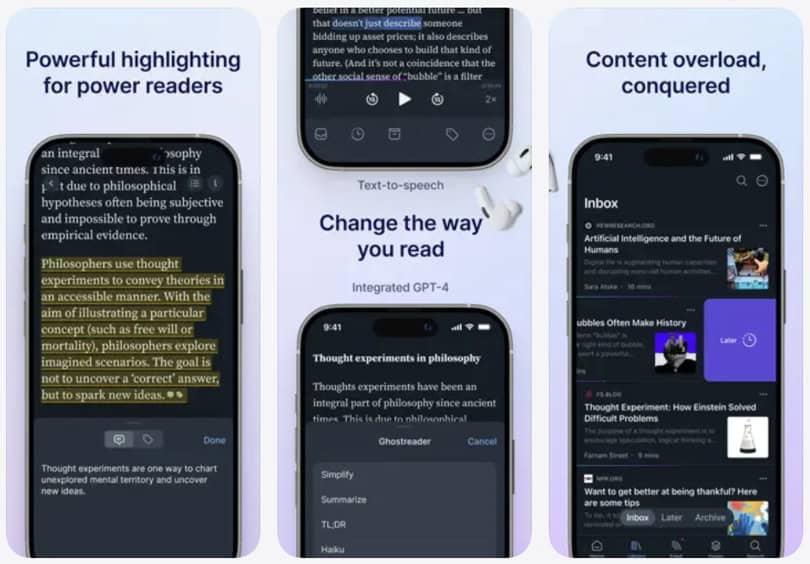
What is Ghostreader AI?
Ghostreader is Readwise Reader’s built-in AI layer, and calling it simply an AI summarization feature undersells what it has become.
The current version operates through a unified chat interface on web and desktop. It replaces the older prompt-button model with something closer to a document-aware research assistant. And that shift matters more than it might appear.
You can ask Ghostreader to explain a specific passage you’ve highlighted. Or, you may ask it to generate flashcard questions from your own highlights. It’s also possible to request a full document summary or ask a free-form question about the content you’re currently reading.
Answers include citation links that point you back to the exact text used to form each response. That grounds the output in the source material rather than in the model’s interpretation, where the risk of hallucination is concentrated.
The model underneath Ghostreader
The underlying model is GPT-4.1-mini, included in your subscription. It is an older version for sure. But don’t fuss too much about the version number, as the GPT model version might be updated quickly.
However, users who bring their own API key can access more capable reasoning models for custom prompts. That is a meaningful architectural choice. It means Ghostreader compounds in capability as models improve, without requiring a separate AI subscription.
In my experience, the response quality is solid for most annotation-level queries. I would not treat it as a replacement for a dedicated research tool, but it is genuinely useful within the (AI) reading flow.
Document awareness as a design distinction
This is not a bolt-on summarization button. Ghostreader knows your reading position at all times. It answers contextually — “summarize the last section I read” is a valid prompt.
That level of document-awareness puts it in a different category from pasting text into a general-purpose chatbot. This distinction is rather architectural than cosmetic.
Ghostreader in an AI reading workflow
In the context of our 3-Step AI Speed Reading Method, Ghostreader fits most naturally into Steps 1 and 2.
A document-level summary before reading builds cognitive scaffolding, which is precisely what Step 1 is designed to produce. Paragraph-level explanation during reading supports comprehension without requiring you to leave the app for external research — Step 2, handled natively.
Readwise Reader’s AI text-to-speech feature maps directly onto Step 2’s audio consumption pathway. I find this genuinely useful for newsletter-length content: listening at 1.5x while away from the screen, then returning to annotate key passages visually. That loop (audio pass, then visual annotation, then Ghostreader Q&A) is something no external toolchain replicates with the same continuity.
The flashcard generation bridges Steps 2 and 3. Highlights you mark for review become potential flashcard prompts that Ghostreader generates automatically and feeds directly into the daily spaced-repetition review.
For readers working through dense nonfiction or academic material, this pipeline — save, read, annotate, AI-enhance, review — is the most complete AI-assisted active reading workflow available in a single subscription.
That said, Readwise Reader fits into the 3-Step Method only partially. It does not provide RSVP or bionic reading formatting (Step 2’s visual acceleration tools), nor does it natively run AI-generated quizzes, as a general-purpose chatbot can in Step 3.
The daily review surfaces past highlights rather than generating new questions from your notes. For the full Step 3 workflow, you’ll likely still need an external tool alongside Reader.
Is Ghostreader a great feature and tool?
For passive readers who want a quick summary and move on, Ghostreader adds modest value. The summary quality is good but not exceptional compared to pasting text directly into Claude.
For readers who annotate deeply and want to extract maximum value from their highlights, Ghostreader’s inline, context-aware design adds real workflow value that external AI tools cannot replicate without manual copying.
Verify current Ghostreader capabilities and any usage limits directly at readwise.io, as development on this feature is active.
Readwise Reader AI workflow in a nutshell:
- Document-level summaries support pre-reading triage (Step 1 of the 3-Step Method)
- Paragraph-level explanation supports active reading without app-switching
- AI text-to-speech enables audio consumption as part of a hybrid reading pass
- Citation links in Ghostreader’s chat keep answers grounded in source text
- Flashcard generation from highlights bridges the annotation to retention
- Readwise Reader strongly fits Steps 1 and 2. Step 3 coverage is partial and benefits from an external tool
Readwise Reader — The Retention Loop and Spaced Repetition
This is actually a topic most Readwise Reader reviews skim past. And it is the one that most determines whether Readwise Reader is right for you.
How the retention loop works
Every highlight you make inside Readwise Reader syncs automatically to the Readwise daily review system. Each day, that system surfaces a selection of past highlights using a spaced-repetition algorithm, showing older highlights less frequently as retention improves and newer ones more often.
The daily review takes five to ten minutes. Over time, passages you once read and forgot instead become material you actually remember.
The mechanism is sound. Spaced repetition is one of the most empirically supported memory techniques in cognitive science, and that is not a marketing claim. The question is not whether the system works. It does, believe me. It is more a question of whether you will use it. Damn!
The habit problem
Bad news for the playful mind. Readwise Reader does not gamify the retention loop. There are no streaks, no points, no push notifications that meaningfully pressure you to complete your daily review.
The system is powerful for people who already have a review habit and want a better tool for it. It is less effective for people who hope the app itself will install that habit. Anki has a similar problem, but at least Anki is free. At $9.99/month, the expectation that you’ll show up and do the work is baked into the price.
This is an honest self-selection test before you subscribe. If you currently review notes, highlights, or flashcards with any regularity — even imperfectly — Reader will make that habit more powerful.
If you don’t, the retention system will silently accumulate a backlog that you never clear, and the Full plan’s differentiating value will sit unused.
Why this matters for SpeedReadingLounge.com readers
Speed reading without retention is performance without output. The 3-Step AI Speed Reading Method rests on the premise that reading faster only matters if you retain and apply more.
Readwise Reader’s retention loop is the most direct implementation of that principle available in a read-it-later tool. For readers who treat their reading as input to thinking, writing, or decision-making, the pipeline that the Readwise Reader enables—save, annotate, review, retain—is architecturally aligned with what this site teaches.
Retention loop summary:
- Highlights from Readwise Reader automatically enter the spaced repetition daily review
- Daily review takes five to ten minutes at a typical annotation volume
- The system is passive — the habit must be user-supplied
- For readers with existing review habits, the compound effect is substantial
Readwise Reader Pricing
There are two plans to enter the Readwise universe.
Readwise Lite, at $5.59/month billed annually, covers the daily highlight review and basic library tools — but does not include Reader.
Readwise Full, at $9.99/month billed annually or $12.99/month billed monthly, includes everything: Reader, Ghostreader, spaced repetition, and all integrations.
That is the plan this Readwise Reader review is about, and there is no Reader-only subscription — Reader is bundled exclusively with the Full plan.
Readwise Reader free trial
Reader currently offers a 30-day full-access trial. That is generous for a subscription app, and it reflects the product’s confidence in its habit-formation value. However, please verify the current trial terms directly at readwise.io before signing up, as conditions may change.
Readwise Reader value assessment
At $9.99/month billed annually, Reader sits above every major free-tier competitor: Pocket, Instapaper, and the now-discontinued Omnivore. Against Matter, which has no equivalent retention backend, the comparison is closer on features, but Readwise Reader wins on annotation depth and retention integration.
For a reader who uses the daily review consistently, $9.99/month is defensible. For a reader who wants a capable read-it-later app and nothing more, it is likely not.
In my opinion, the value calculation is clear. You are not paying for the inbox. You are paying for what happens to your annotations after you close the tab.
If that pipeline doesn’t appeal to you, the Readwise Reader app price won’t feel justified — and no amount of feature breadth will change that.
You can verify current pricing directly at readwise.io/pricing.
Readwise Reader — Web, Mobile, and Desktop Apps
Web app is the primary interface
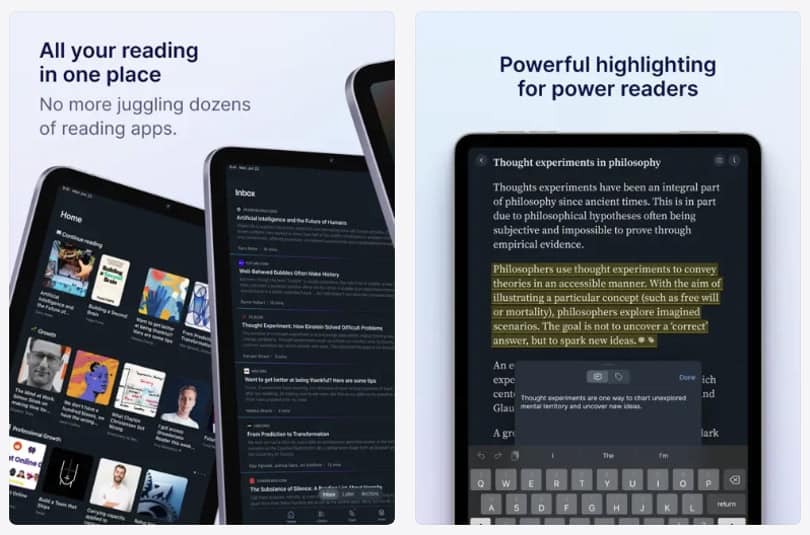
Readwise Reader’s web app is the most feature-complete version of the product. It handles all supported content types, offers the full filtering and library management system, and is where Ghostreader’s AI chat interface is most reliably accessible.
If you spend significant reading time at a desk, the web app is where Readwise Reader performs best. The experience is noticeably more powerful than on mobile, and that gap is worth knowing about before you subscribe.
Readwise Reader iOS and Android apps
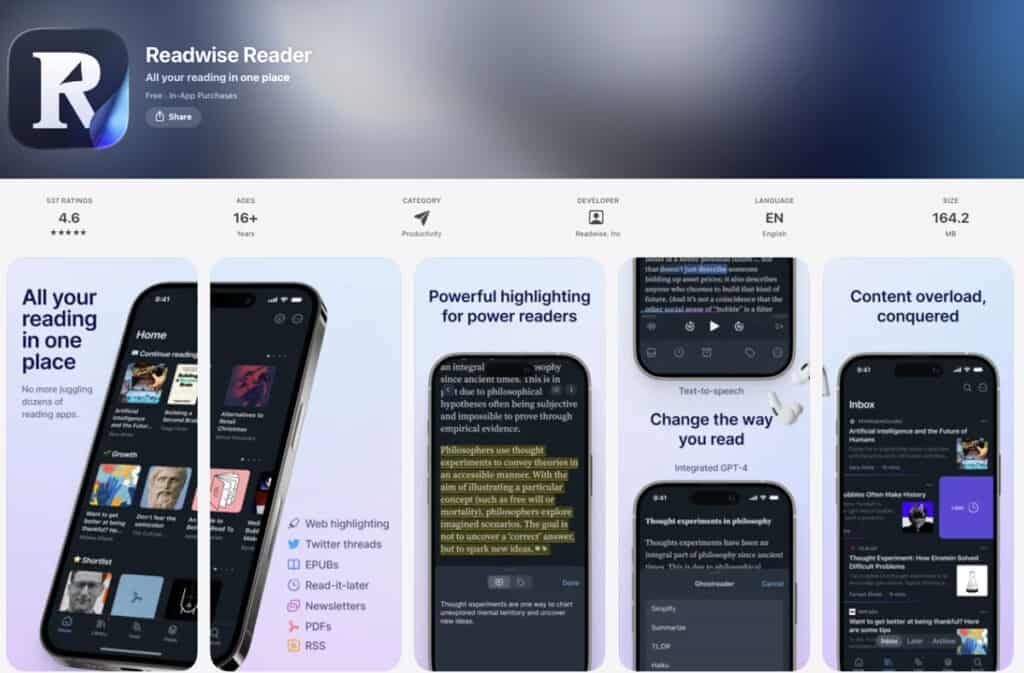
The mobile apps are well-regarded and functional. Reading, annotation, and highlight management work reliably on both platforms. The Readwise Reader iOS app carries a 4.6/5 rating on the App Store.
Feature parity between mobile and web is generally high for core reading functions, though some library management and filtering operations are smoother on the web. Ghostreader’s chat interface on mobile is in active development at the time of writing my Readwise Reader review. Please verify current mobile AI feature parity at readwise.io before publication.
Readwise Reader browser extension
The extension runs on Chrome, Firefox, Safari, and Edge. Saving to Readwise Reader from a browser is a single click.
The extension also enables highlighting directly on web pages before pushing content to Readwise Reader, a workflow feature that serious users appreciate. Installation and reliability are generally smooth, though occasional conflicts with site-specific scripts occur on complex web applications.
Readwise Reader Desktop
Reader operates as a local-first web app across platforms. On Mac, it can be installed as a Chrome app or via a Safari web app wrapper. A standalone native Windows desktop app has not been confirmed — Windows users access the desktop app via the web app.
Again, I recommend verifying current desktop options directly at readwise.io if you are not sure, but rely on the desktop apps.
Readwise Reeder Platform experience:
- Web app is the most complete version of the product
- iOS and Android apps are functional and well-reviewed (4.6/5 on App Store)
- Browser extension is reliable across major browsers
- Local-first web app works on all desktop platforms; installable as a Chrome or Safari app on Mac
Readwise Reader Pros and Cons, Limitations
Readwise Reader Pros
Annotation depth.
Reader’s highlight system is the most architecturally sophisticated in the category. Color-coding, tagging, note attachments, and nested highlights in a single interface — combined with filtering that scales — give researchers and writers a tool that does not degrade as their library grows.
Pocket and Instapaper both hit a ceiling of usefulness at high volume. Readwise Reader is designed to scale.
Content format breadth.
Save a web article, a PDF, an EPUB, a newsletter, an RSS feed, a YouTube video, or a Twitter/X thread — everything lands in one inbox with consistent annotation tools across all formats. No other read-it-later app at this price handles EPUB import and YouTube transcript highlighting in the same product without an external integration.
Ghostreader’s inline AI design.
The AI layer being context-aware at the highlight level, with citation links grounding every answer in source text, is a genuine architectural advantage.
Generating flashcard prompts from your own highlights in the same app that syncs with your spaced-repetition review is a workflow that would otherwise require three separate tools and manual copying.
I find that consolidation meaningfully reduces friction.
The retention system, when actually being used.
For readers who commit to the daily review habit, the compound effect of saving, annotating, and reviewing within a single ecosystem is measurable. Spaced repetition works, the integration is seamless, and for serious learners, the value accrues over months in a way no single-session reading tool can replicate.
The 30-day trial.
A full-access trial of this length is confident and reader-friendly. It is long enough to form a reading and review habit and evaluate the product honestly.
Readwise Reader Cons
The pricing split creates confusion.
The Lite plan at $5.59/month looks like an entry point to Reader. It isn’t. Readwise Reader requires the Full plan, which is $9.99/month annually. In my opinion, the product deserves a more prominent explanation of this before checkout — first-time visitors to the pricing page regularly misread what each tier delivers.
The habit dependency.
Readwise Reader’s most powerful feature — the spaced repetition review — requires the user to do the work. Reader does not gamify, nudge, or create meaningful behavioral friction to encourage the daily review. Users who are not already review-habit practitioners risk paying $9.99/month for an elaborate inbox.
PDF limitations at the edges.
Scanned PDF rendering and annotation are inconsistent. Academic users with older or image-heavy documents will encounter friction that the standard PDF workflow doesn’t prepare them for.
No native speed reading features.
Readwise Reader has no RSVP mode, no spritz-style display, and no adjustable reading cadence tool. For speed readers specifically, Readwise Reader is a retention tool, not a velocity tool. The two goals are compatible but distinct, and Reader does not address reading speed directly.
Mobile feature parity.
Some advanced filtering and library management operations are better on the web than on mobile. Ghostreader’s full chat interface is currently web-first. Power users who read primarily on a phone will encounter occasional interface constraints.
Readwise Reader alternatives worth considering
| Feature | Readwise Reader | Matter | Instapaper | |
|---|---|---|---|---|
| Price | $9.99/mo (annual) | Free / $9.99/mo | Free / $4.99/mo | Free / $4.99/mo |
| Spaced repetition | Yes (built-in) | No | No | No |
| RSS reader | Yes | Limited | No | No |
| PDF annotation | Yes | Limited | No | Basic |
| EPUB support | Yes | No | No | No |
| YouTube transcripts | Yes | No | No | No |
| AI features | Yes (Ghostreader) | Basic | Basic | No |
| Best for | Knowledge workers | Newsletter readers | Casual saving | Minimal interface |
Note: Omnivore, previously a strong open-source alternative with Obsidian integration, shut down in late 2024 after acquisition by ElevenLabs. Readers who were using Omnivore are now the most natural audience for a Readwise Reader migration.
Recommended alternatives for AI speed readers
For readers who want AI-assisted reading without a subscription: see my review of the best AI summarizer apps.
For readers building a broader AI reading workflow, the 3-Step AI Speed Reading Method guide explains how to combine tools like Readwise Reader with active speed reading techniques to maximize retention.
Readwise Pros and Cons Summary
- ✔️ Best-in-class annotation system that scales with library size
- ✔️ Broadest content format support in the category (EPUB, YouTube, RSS, PDF)
- ✔️ Ghostreader AI is contextually integrated with citation-linked answers
- ✔️ 30-day full-access trial, the most generous in the category
- ✖️ Pricing structure is confusing — Reader requires the Full plan at $9.99/month, not the Lite plan
- ✖️ Retention system only delivers for users who build the daily review habit
- ✖️ No native speed reading or RSVP features
Readwise Reader Review Verdict
Readwise Reader is the right tool for the right reader. Very generic, apologies, but true. And I’d give this a solid 8 out of 10.
The app earns that title as the most complete retention-focused reading tool in the category, but the score comes with a condition. It applies only to readers who use it as designed. I stress: as designed.
Who should subscribe to Readwise Reader?
If you read to learn — if articles, papers, newsletters, and long-form content are inputs to your thinking, writing, or professional work — Readwise Reader at $9.99/month (Full plan, billed annually) is the strongest tool available for the job.
The annotation system, content breadth, the Ghostreader AI layer, and the built-in spaced-repetition review form a reading workflow that compounds over time.
Researchers, writers, students, and knowledge workers who currently maintain any form of note review habit will find that the system makes that habit more powerful almost immediately.
Furthermore, former Omnivore users looking for a migration path will find Readwise Reader the most feature-comparable option. The retention layer is an upgrade on what Omnivore offered.
Who should skip Readwise Reader?
Close this tab (sorry for making you read this far) if you read casually and rarely return to saved articles. Pocket’s free tier handles that use case without a subscription.
Also, close this Readwise Reader review if you are hoping the Readwise Reader app will create a daily review habit from scratch — the evidence, and the product’s design, argue against that outcome.
And again, close it if you want native speed reading features — Reader does not offer RSVP or reading-speed training, and that is not what it is built for. There are better options here, such as the Spreeder app.
| Field | Detail |
|---|---|
| Product Name | Readwise Reader |
| Developer | Readwise Inc. |
| Platform | iOS / Android / Web (local-first) / Mac (Chrome app or Safari wrapper) |
| Price | $9.99/month billed annually ($12.99/month billed monthly) — Full plan required |
| Free Trial | 30 days full access (verify current terms at readwise.io) |
| App Store Rating | 4.6/5 (iOS App Store) — verify current rating directly |
| Play Store Rating | Verify directly at Play Store |
| AI Features | Yes — Ghostreader (chat interface, inline summarization, Q&A with citation links, flashcard generation, AI text-to-speech) |
| Best For | Knowledge workers and researchers who annotate heavily and maintain a daily review habit |
| Not For | Casual readers or readers seeking native speed reading features |
| Our Review Rating | 8/10 |
Interesting sources:
If you like to see what the evidence actually says about speed reading and reading tech, it’s worth dipping into original research rather than app marketing. These non‑commercial sources on RSVP reading, bionic reading, eye movements, regressions, comprehension, and retention are a solid starting point:
Curious what science says about RSVP, bionic reading, eye fixations, and regressions? These original studies and reviews are a good starting point:
- Modern Speed‑Reading Apps Do Not Foster Reading Comprehension (Rayner et al., 2016):
https://pubmed.ncbi.nlm.nih.gov/29461715/ - Perceptual Learning in an RSVP Reading Task (Chung, 2014):
https://pmc.ncbi.nlm.nih.gov/articles/PMC4274879/ - Guiding the Gaze: How Bionic Reading Influences Eye Movements (2025):
https://pmc.ncbi.nlm.nih.gov/articles/PMC12565662/ - Eye Movements and Fixation‑Related Potentials in Reading – Review (Schuster et al., 2020):
https://pmc.ncbi.nlm.nih.gov/articles/PMC7157570/ - A Cognitive Model of Regressive Eye Movements During Reading (von der Malsburg & Vasishth, 2020):
https://pmc.ncbi.nlm.nih.gov/articles/PMC7888242/
Disclosure: This post contains affiliate links to some partners. Speed Reading Lounge may receive a commission for purchases made through these links. It does not add any extra costs. All reviews, opinions, descriptions, and comparisons expressed here are our own.