
Beeline Reader Review 2026
BeeLine Reader review: Does the gradient help you read better?
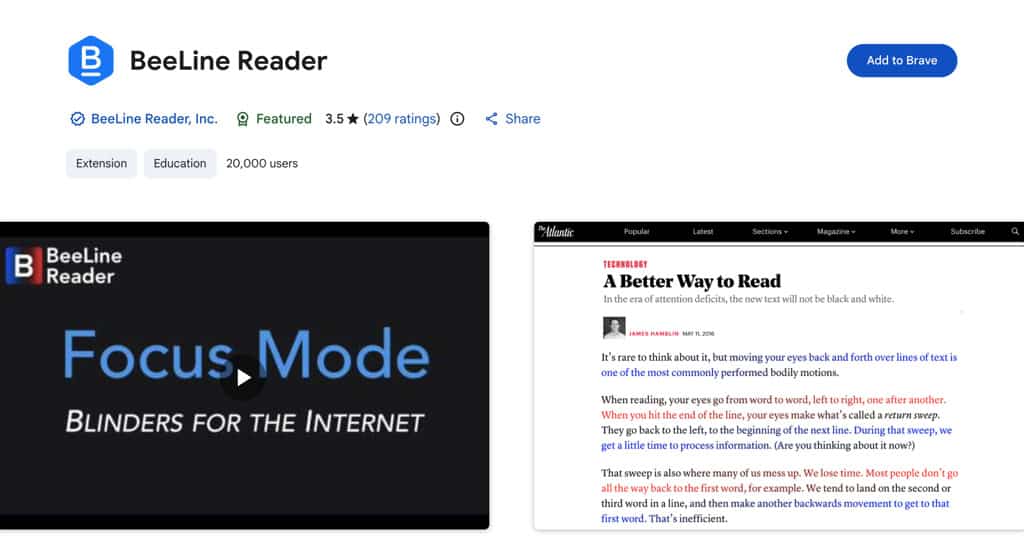
What is the Beeline Reader app? Well, picture a highlighter that never marks the page but still guides your eyes through it.
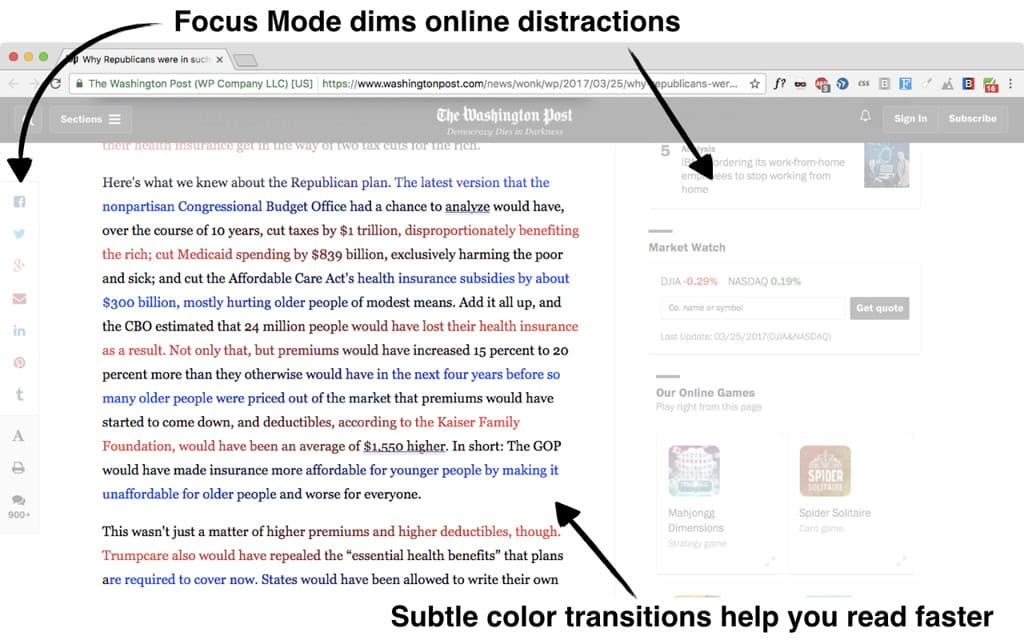
The BeeLine Reader wraps each line of text in a color gradient so the end of one line bleeds into the start of the next. Your eye follows the color the way water follows a slope. No more searching for where the next line begins.
That’s actually very interesting. Because reading is more physical than most people realize. Every time your eye finishes a line, it has to jump back to the left margin and land precisely on the line below.
On a wide screen, that jump is long, and your eye regularly lands one line too high or too low without you even noticing. And the BeeLine Reader addresses that specific moment.
However, what reasonable research cannot confirm is whether anything changes after you close the extension. With the tool active, the benefit is definitely present. But without it, you likely return to exactly where you were.
Understanding that distinction is one of the goals of this BeeLine Reader review. We look at the science, the genuine value of accessibility, and the platform gaps. We also discuss where BeeLine Reader fits within an AI-augmented reading workflow, so you can decide with confidence whether it belongs in yours.
BeeLine Reader — Overview
Origin and design thinking
Nick Lum and Andrew Cantino built BeeLine Reader around 2013 as a personal experiment in reducing reading fatigue during heavy digital sessions.
Lum, a Stanford and Harvard Law graduate, developed the arc-gradient mechanism to address a problem he noticed while reading. Since then, it has grown from a single Chrome extension to Firefox, iOS, a Safari extension, and a dedicated web app.
Few tools occupy such a specific position: It’s too science-backed for casual users, too passive for active speed reading training, and too niche for mainstream productivity tools.
Where Beeline Reader fits in the speed reading landscape
If you have come across Bionic Reading, you already know the concept of text formatting that helps your eyes move through it more efficiently. Bionic Reading bolds the first letters of each word, giving your brain visual anchors to jump between within a line.
BeeLine Reader solves an adjacent problem. Bionic Reading helps within a line. BeeLine Reader helps between lines. Understanding that difference is what makes choosing between them straightforward. And I will come back to it in the comparison section with a full side-by-side.
Why Beeline Reader exists
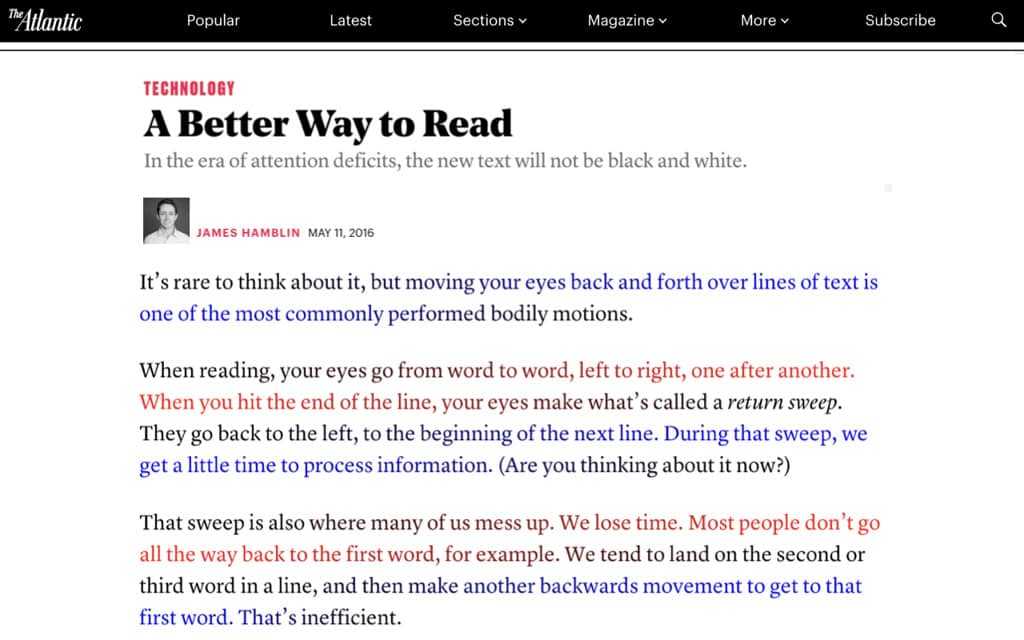
When reading, your eyes do not move smoothly across a line. They jump in short, rapid bursts called saccades, pausing briefly at each fixation point to extract meaning.
Skilled readers make fewer, longer fixations. Weaker readers make more fixations and more regressions, which are backward jumps to re-read missed content.
Understanding how eye fixation affects reading speed is the foundation for understanding why BeeLine’s return-sweep mechanism is plausible.
At the end of each line, one longer jump carries your gaze back to the left margin. On wide digital columns, misalignment at that moment is frequent enough to measurably affect reading comfort.
Core platform availability
- Chrome extension (free, unlimited on websites; Pro from $2/month)
- Firefox extension (desktop; Android version has a documented display bug)
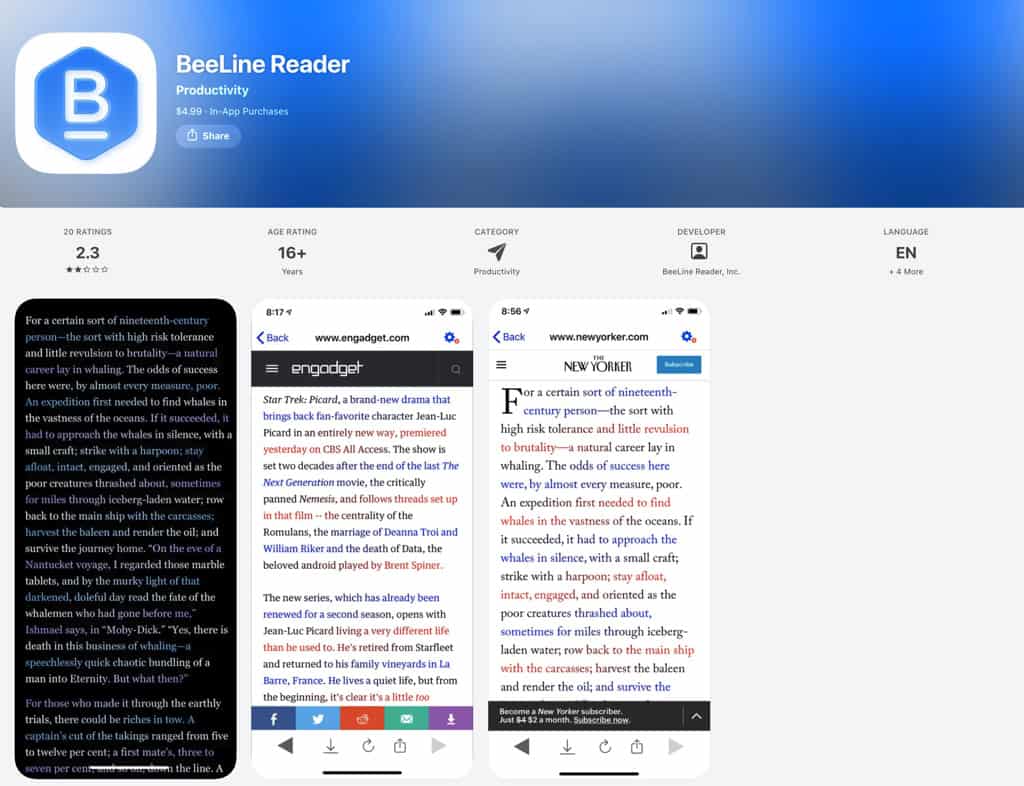
- iOS app ($4.99 one-time; PDF and eBooks add-ons available separately)
- Safari extension for iOS (free)
- Dedicated Beeline Reader web app
Who BeelineReader is for
Primary audience: Readers with dyslexia, ADHD, or visual stress; heavy digital readers experiencing line-tracking fatigue; students working through large volumes of online text; accessibility-focused educators and institutions.
Who it is not for: Readers seeking permanent speedreading skill development; users whose workflow primarily involves PDFs, ebooks, and Kindle without the paid add-ons; anyone expecting an AI-integrated reading environment.
Beeline Reader capabilities at a glance
- Arc-gradient color overlay applied to web text in real time
- Multiple color themes, including high-contrast and photosensitivity-friendly palettes
- Text-to-Speech in the iOS app
- Kindle reading support on iPad
- Bookshare integration for print-disabled readers
- Education licensing for schools and universities
BeeLine Reader — Features
1. The arc-gradient color system
How the mechanism works.
BeeLine Reader does not apply two alternating text colors. It runs a continuous gradient that bleeds the terminal color of one line into the opening color of the next, creating a chromatic thread your eye follows without conscious tracking.
Picture each line ending in deep blue and opening the next in warm amber. Your eye, arriving at the blue, finds the amber immediately. Over the course of a long article, those milliseconds of saved searching add up to noticeably less fatigue — the kind you normally attribute to screen time rather than eye mechanics.
What it feels like in use.
In my experience, the effect is nearly invisible at first. After a few minutes of reading, the return sweep starts to feel less effortful — much like moving from a noisy room to a quiet one, where the difference only registers once you notice the absence of the noise.
Whether improvement is perceptual or partly psychological is worth examining honestly, and I address that in the science section. What I can say here is that the mechanism is specific. Something real is happening to your reading process.
Color theme options.
BeeLine Reader ships multiple gradient combinations beyond its default palette. High-contrast themes exist for users with photosensitivity. Cooler gradients reduce visual intensity for extended sessions.
A color overlay limited to one visual mode would exclude a meaningful portion of its target accessibility audience, so the range here is a considered design choice.
In a nutshell
- Continuous gradient creates a functional chromatic guide, not visual decoration
- Multiple themes address diverse display and photosensitivity needs
- The effect builds over a full reading session, not immediately
- Patented mechanism, distinct from Bionic Reading’s approach
2. Beeline Reader Browser extensions
Chrome and Firefox.
Installing the Chrome extension takes under a minute, and it activates on any standard web page. No account is required for the free tier. A toolbar icon toggles the gradient on or off, and theme switching happens without a page reload.
Firefox support extends the same core functionality to users outside Chrome — relevant for privacy-conscious readers and institutional environments where Chrome is not the default.
A Firefox caveat worth knowing.
On Android, Firefox does not display BeeLine’s options correctly. Installing it shows only a loading indicator that never resolves. If your reading is primarily mobile on Android, Firefox will not work reliably here.
Chromium-based mobile browsers, such as Kiwi Browser and Edge Canary, support Chrome extensions and serve as functional alternatives.
In a nutshell
- Chrome extension is stable and free with no account required
- Firefox desktop works reliably; Firefox Android has a verified display bug
- Android readers can use BeeLine Reader via Chromium-based mobile browsers instead
- Free tier is unlimited on websites
3. Beeline Reader iOS app
Text-to-Speech as a reading layer.
BeeLine’s iOS app includes Text-to-Speech, letting you listen to articles while the gradient is active on screen. For readers who absorb content better through audio while following the visual text, having both running together is more useful than either feature alone.
On mobile, it turns BeeLine Reader into a hybrid reading experience that the browser extension simply cannot replicate. If text-to-speech is central to how you read, our AI Text-to-Speech apps guide shows how BeeLine Reader compares to dedicated TTS tools.
Kindle reading on iPad.
Reading Kindle content on iPad with the gradient applied is supported in the iOS app. Less publicized than it should be, this feature meaningfully expands BeeLine’s useful range for iPad-based readers and closes one of the most common platform gap complaints I hear from users in this category.
Friction points worth knowing.
A deliberate content import step is required in the iOS app — something the browser extension sidesteps entirely. Returning to the app after switching away can sometimes reset your reading position.
In practice, for readers who regularly look up terms or cross-reference content mid-article, that interruption compounds quickly. App Store reviews note that the interface feels dated compared to current reading apps. It seems fair criticism, and worth knowing before you pay.
In a nutshell
- Text-to-Speech adds a genuine hybrid audio-visual reading option on iOS
- Kindle on iPad is supported — a useful feature that the product’s marketing undersells
- Content import friction is real; the workflow is less ambient than the browser extension
- Position loss on app-switching is a verified user complaint
4. Bookshare and accessibility integrations
Why this pairing goes deeper than marketing.
BeeLine Reader integrates directly with Bookshare, the accessible ebook library serving users with print disabilities.
For a reader with dyslexia who already depends on Bookshare for accessible content, applying BeeLine’s gradient on top addresses two layers of reading difficulty at once: content access and line-tracking strain.
You can find a broader overview of apps addressing dyslexia and reading differences in our dyslexia apps guide.
Independent recognition that carries weight.
BeeLine Reader has received awards from Stanford BASES, MIT Solve, and the United Nations. Zero Project, which documents accessibility innovations globally, has also included BeeLine Reader among notable solutions.
None of these represents commercial partnerships. A consistent pattern of independent validation from organizations with no commercial stake is, in my view, worth more than any amount of self-reported user data.
In a nutshell
- Bookshare integration addresses both content access and line-tracking for print-disabled readers
- Stanford, MIT Solve, and UN recognition confirm credible third-party validation
- Zero Project inclusion reflects genuine accessibility impact
- Integration matters most for users already relying on Bookshare
5. Web app reading mode
Useful in specific contexts.
At beelinereader.com, you can paste text or a URL and read it in gradient mode without installing anything. In institutional settings where browser extensions are blocked, a functional workaround is available here.
For regular reading, being inside BeeLine’s own interface rather than your browser creates a subtle shift in context that starts to matter over long sessions. In my experience, the web app works well for one-off tasks and less well for sustained reading.
6. Education licensing
BeeLine’s strongest validated case.
Institutional licensing for schools and universities starts at approximately $3 per student per year for a single class, with lower rates for school and district licenses.
A CNET pilot study found that readers using BeeLine read nearly 50% further into articles than those using standard text — a result that speaks more to student engagement and reading completion than raw speed.
Independent, educator-led research demonstrates gains in fluency and comprehension, particularly in special education and ESL settings. Northern Arizona University’s Disability Resources office lists BeeLine Reader as a recommended assistive tool for enrolled students.
In a nutshell
- Education licensing costs approximately $3 per student per year
- CNET pilot study: BeeLine readers read roughly 50% further into articles than control readers
- Independent research shows fluency and comprehension gains in special education and ESL contexts
- Institutional adoption by NAU Disability Resources confirms real-world utility
BeeLine Reader — The Science Behind the Color Gradient
Scientific credibility is not one of several selling points for BeeLine Reader. It is the entire value proposition. So examining that evidence honestly — not deferentially — is exactly what you deserve before deciding whether to use it.
1. What the research actually claims
How your eye moves — and where it fails.
Reading is not a smooth glide across the page. Your eyes move in rapid, jerky bursts, pausing at fixation points to extract meaning. Skilled readers make fewer, longer fixations. Weaker readers make more fixations and more regressions — backward jumps to re-read missed content.
Understanding eye fixation and reading speed is the foundation for understanding why BeeLine’s return-sweep mechanism is plausible. At the end of each line, one longer jump carries your gaze back to the left margin. On wide digital columns, misalignment at that moment is frequent enough to measurably affect reading comfort.
Peer-reviewed support.
A 2022 study published in Computers and Education Open (ScienceDirect) examined BeeLine Reader specifically in an educational context. This is some of the most directly applicable evidence available.
Research datasets related to reading performance with color gradient overlays are also available through the Dutch Dataverse repository. Both actually support the mechanism. And neither is marketing material.
2. What the research does not confirm
No durable speed improvement.
None of the research I reviewed shows that BeeLine makes users measurably faster readers once the tool is inactive. Any speed or comprehension benefits disappear when you close the extension.
A reader who uses BeeLine Reader for a year and then reads without it is in precisely the same position as a new user. I think you deserve to hear that plainly — not buried in caveats.
Modest, inconsistent effects across general populations.
A PMC-published study on coloured overlays and reading fluency (PMC5290069) provides useful context. Color overlays show modest, inconsistent effects among typical readers, with stronger evidence for those with specific visual stress conditions.
BeeLine’s evidence base is more credible than most competitors in its category. “More credible than competitors” and “conclusively proven” are not the same thing, and holding both at once gives you a more accurate picture than letting one quietly replace the other.
3. Dyslexia and ADHD — what can be said carefully
A reasonable basis, not settled proof.
Visual crowding — where lines of text interfere perceptually with each other — is a documented challenge for some readers with dyslexia. BeeLine’s line-tracking function may reduce that interference.
A 2013 analysis from NYC Dyslexia Research examined BeeLine Reader in this context, finding suggestive rather than definitive evidence. BeeLine’s internal testing found that many users with dyslexia or ADHD increased their reading speed by 50% or more. That’s promising data that comes from the founders’ own records.
Institutional adoption by universities, Bookshare, and the Zero Project adds a layer of weight that lab data alone cannot provide. If you are researching tools specifically for dyslexia, our dyslexia apps guide puts BeeLine Reader in a broader context.
4. The bottom line on science
Credible, bounded, and useful in context.
BeeLine’s scientific grounding is more credible than most reading tool marketing. Peer-reviewed work supports the general approach. What it does not support is using BeeLine Reader as a speed reading trainer.
Think of it as an assistive overlay with a documented perceptual rationale. That framing is more honest and more practically useful than any speed claim.
BeeLine Reader — AI Features + Reading Workflow
No AI — and why that matters
A clear statement first.
BeeLine Reader contains no AI features. No machine learning, no adaptive personalization, no natural language processing. Its gradient algorithm is deterministic, meaning it applies the same color transformation to any text it encounters, with no learning loop and no user modeling.
You are getting a precise visual overlay, applied consistently, every time. Not an intelligent reading assistant.
Worth noting as a limitation.
For the mechanism itself, the absence of AI is largely irrelevant. A smarter color overlay is not an obviously useful concept.
But as reading tools increasingly incorporate AI for summarisation, comprehension checking, and adaptive pacing, BeeLine Reader’s purely visual approach starts to look like a first-generation solution without a clear upgrade path.
Standing still by design is an honest position. Acknowledging what that costs you is equally honest.
How BeeLine Reader fits the 3-Step AI Speed Reading Method
Where BeeLine Reader belongs.
Covered in full in our AI Speed Reading Guide, the 3-Step AI Speed Reading Method structures reading into three phases: pre-reading synthesis, active hybrid consumption, and post-reading retrieval.
BeeLine Reader belongs in Step 2, within the visual reading option of Hybrid Consumption. Reducing perceptual friction during active reading allows cognitive resources to focus on meaning rather than eye guidance. For readers with visual stress or ADHD, that freed-up attention is probably not a small thing.
What BeeLine Reader cannot do.
Step 1 is entirely outside its reach. BeeLine has no capacity to summarise, scan for relevance, or help you decide what is worth reading. Step 3 is equally absent. There are no annotations, no flashcard export, and no retrieval practice.
Finishing an article with BeeLine Reader and wanting to retain what you read means opening an entirely separate tool.
Tip: If building a complete reading and retention workflow is your goal, our reading retention guide and reading comprehension strategies show what that fuller stack looks like.
A realistic hybrid workflow.
Here is how I would use BeeLine within the 3-step framework in practice. I would run a long research document through an AI summarizer first (ChatGPT or Claude) to identify which sections deserve close reading.
Then I would open the full article in Chrome with BeeLine active, reading only those flagged sections with the gradient reducing eye fatigue. BeeLine handles the perceptual layer. The AI handles the cognitive triage.
Used together deliberately, the combination works well. But nothing automates that handoff. You build it manually, and BeeLine Reader plays no part in facilitating it.
Honest positioning.
BeeLine Reader partially fits the 3-Step AI Speed Reading Method. It strengthens the active visual reading phase for readers who experience line-tracking strain. Beyond that phase, it has nothing to contribute — and saying so plainly is more useful than overstating its role.
BeeLine Reader Pricing
Free tier
What you actually get for nothing. Chrome and Firefox extensions are free and allow unlimited use on standard websites. No account required. For a reader whose work is entirely web-based and runs in a single desktop browser, the free tier is essentially the complete product. Accessibility-first pricing like this is rarer than it should be, and worth acknowledging plainly.
Paid tiers
Browser Pro. BeeLine Reader Pro for the browser costs $2/month for one browser, or $4.50/month for up to five browsers. Annual subscriptions are available at a reduced rate. In my view, the paid browser tier adds color theme flexibility and cross-browser synchronization. This is useful for multi-device readers, but marginal for single-device users.
PDF plugin. At $5/month for up to four browsers — with annual billing giving one month free — the PDF plugin is where BeeLine Reader’s value argument becomes more specific. Without it, a significant gap in platform coverage is only discovered after relying on the tool. For regular PDF readers, it closes that gap directly.
iOS app. Priced at $4.99 for a one-time purchase, the iOS app also offers in-app purchases: a PDF Reader for $9.99 and an eBooks Pro option for $19.99. All iOS purchases are one-time, not subscription-based, and sync across your iOS devices. Clarity on what is and isn’t included in the base price is worth checking before committing — the in-app purchase stack means features arrive incrementally.
Education licensing. Institutional pricing starts at approximately $3 per student per year for a single class, with lower rates for school and district licenses. Verify current education rates directly at beelinereader.com/education.
Value assessment
A direct judgment. At zero cost for the core browser mechanism, the free extension is a good value by any measure. Upgrading the browser tier makes sense for multi-device users and is marginal for everyone else. The PDF plugin is worth the price if PDFs are a significant part of your workflow. Always verify current pricing directly at beelinereader.com before subscribing, as pricing has changed across the product’s history.
- Free browser extension delivers the complete core mechanism at no cost, no account required
- PDF plugin ($5/month) is worth it only if PDFs are central to your reading workflow
- iOS app ($4.99 one-time) is fair; the in-app purchase stack warrants careful review
- Education licensing from approximately $3/student/year is the strongest institutional value point
BeeLine Reader — Pros, Cons, Alternatives
Pros – What BeeLine Reader gets right
Zero setup friction.
Installing the Chrome extension takes under a minute, requires no account, and delivers the core mechanism immediately. For a reader encountering a long article and seeking perceptual relief right now, few comparable tools deliver this.
There is a reason for this. Onboarding-heavy tools rarely get used consistently. BeeLine Reader sidesteps that problem entirely.
Genuine accessibility value.
For readers with dyslexia, visual stress, or ADHD-related attention drift, BeeLine Reader addresses a real perceptual problem with more scientific grounding than most accessibility reading tools.
Bookshare integration, Zero Project recognition, Stanford, MIT Solve, and UN awards, alongside institutional adoption by university disability services — none of these are marketing signals. Each reflects utility for a specific reader population, confirmed by organizations with no commercial stake.
Non-intrusive design.
Operating as a visual layer on your existing reading environment, BeeLine Reader does not redirect you to a different interface or modify the content itself.
For readers who have built workflow habits around specific browsers and platforms, staying inside a familiar environment while gaining a perceptual assist is a practical advantage that compounds over time.
Genuine differentiation from Bionic Reading.
BeeLine’s arc-gradient mechanism is patented and specific. Bionic Reading uses bold-weighted text to anchor attention within a line, which is a different visual strategy targeting a different moment in the reading act.
An independent Readwise study of 2,074 users found Bionic Reading produced no statistically significant improvement in reading speed. BeeLine’s internal and independent data tells a more credible story. It’s bound, but credible.
Cons – Where BeeLine Reader falls short
No skill transfer.
Any speed or comprehension benefits disappear when you close the extension. No training occurs. No oculomotor efficiency builds independently. A reader who uses BeeLine Reader for a year and then reads without it is in precisely the same position as a new user.
For readers who want to become better readers — not just more comfortable ones while a specific tool is active — understanding this before committing is essential.
Platform coverage is genuinely limiting.
Reliable gradient delivery works on standard web pages in Chrome and Firefox on desktop. PDFs require the paid plugin. Native integration with Readwise or Instapaper is absent.
Firefox on Android has a verified display bug. Users whose reading spans multiple formats and platforms will find BeeLine Reader active in only a fraction of their reading contexts.
Underdocumented adaptation curve.
Some readers find the gradient distracting for the first several sessions — a visual novelty that competes with content for attention. BeeLine Reader’s own materials mention an adaptation period without quantifying it.
Readers who test the extension for twenty minutes and find it jarring may quit before the mechanism has time to work as intended. My suggestion: commit to at least three full reading sessions before forming a judgment.
Free vs. paid value gap.
The core mechanism is free. Paid tier additions are convenience upgrades, not functional ones, for most users. Upgrading makes sense only in specific circumstances.
No active reading features.
No annotations. No comprehension checks. No speed pacing. No summarisation.
In a category where competing tools increasingly offer multi-feature reading environments, a passive overlay starts to feel incomplete for readers who want a more structured workflow. Pairing the BeeLine Reader with tools from our speed reading apps guide is one way to overcome that challenge.
BeeLine Reader vs. alternatives
| Feature | BeeLine Reader | Bionic Reading | Readwise Reader | Spritz |
|---|---|---|---|---|
| Core mechanism | Arc colour gradient | Bold-text anchoring | AI reading environment | RSVP word-by-word |
| Skill transfer | None | None | Partial (habits) | None |
| AI features | None | None | Yes — substantial | None |
| Free tier | Yes (browser extension) | Limited | Free trial | Free tier |
| Platform coverage | Web, iOS, iPad Kindle | Web, select apps | Web, iOS, Android | Web, iOS |
| Accessibility focus | Strong | Moderate | Low | Low |
| Science backing | Moderate–strong | Weak–moderate | Not applicable | Contested |
| Best for | Dyslexia, ADHD, eye fatigue | General attention anchoring | Serious reading workflows | Speed training |
Beeline Reader alternatives:
If you want a richer reading workflow with AI integration, Readwise Reader is the stronger choice. Annotation, AI summarisation, and cross-platform reading are available in a single environment. BeeLine Reader’s overlay would be redundant inside it.
If you are more interested in how visual formatting tools compare within an AI-augmented reading approach, our AI Speed Reading Guide covers the full landscape in greater detail.
Pros summary:
- Frictionless free browser extension — no account required, unlimited on websites
- Genuine accessibility value for readers with dyslexia and ADHD
- Non-intrusive overlay — works inside your existing browser, not around it
- Bookshare integration for print-disabled users
- More scientifically grounded than Bionic Reading
- Text-to-Speech in the iOS app adds a useful audio reading layer
- Kindle reading on iPad is supported via the iOS app
Cons summary:
- Zero skill transfer — benefits disappear without the tool active
- Narrow platform coverage — PDF requires the paid plugin; Firefox Android is buggy
- The adaptation period is underdocumented — early quitters miss the benefit
- Paid tier mostly adds convenience, not core functionality
- No active reading features — annotation, comprehension checking, and pacing are all absent
BeeLine Reader Review — Verdict
My BeeLine Reader Review rating is 7.5 out of 10.
One specific thing is done with genuine scientific grounding, and then it stops. For the right reader — someone with dyslexia, visual stress, or a need for line-tracking support during long digital reading sessions — BeeLine Reader definitely delivers a meaningful, nearly frictionless improvement.
Who should use BeeLine Reader?
Use it if you have dyslexia, visual stress, or ADHD-related attention drift during reading. Scientific evidence is strongest here, and the tool earns its place in that reader’s workflow.
Use it if you spend hours reading long-form content in a browser and regularly notice your eyes losing their place. Starting with the free Chrome extension costs nothing and commits you to nothing. Give it at least three full reading sessions before deciding. The gradient needs time to feel natural rather than novel.
Who should skip BeeLine Reader?
Skip it if your primary goal is to become a permanently faster, more capable reader. BeeLine Reader was not designed for that and cannot deliver it.
Skip it if your reading is split across PDFs, ebooks, Kindle, and web — platform gaps will leave the tool unused for large portions of your reading life.
Skip it if you want an AI-integrated reading environment. BeeLine is a focused visual tool in a landscape moving toward intelligent reading systems, and the distance between them is growing.
A structural consideration worth naming.
Single-mechanism architecture makes BeeLine Reader both precise and brittle. If a major browser or reading platform were to incorporate a color gradient overlay as a minor accessibility feature, BeeLine’s core differentiation would narrow significantly. For readers building a long-term reading workflow, keeping that in mind is prudent.
For most readers here — those seeking active skill development and AI-augmented reading efficiency — BeeLine Reader plays a peripheral role at best. For readers with genuine accessibility needs, it remains one of the more credible, friction-free options in its category.
In a nutshell
- BeeLine Reader earns its 7.5 through credible science, frictionless access, and real accessibility value
- The strongest audience is readers with dyslexia, visual stress, or ADHD — not general speed readers
- Bionic Reading lacks BeeLine’s evidence depth; Readwise offers far more active functionality
- Single-mechanism design is both its precision and its ceiling effect
| Field | Detail |
|---|---|
| Product Name | BeeLine Reader |
| Developer | Nick Lum and Andrew Cantino / BeeLine Reader Inc. |
| Platform | Chrome extension, Firefox extension, iOS app, Safari extension, Web app |
| Price | Free (core browser extension) / Pro from $2/month — verify at beelinereader.com |
| Free Tier | Yes — core gradient function free and unlimited in browser extensions |
| App Store Rating | Verify directly at apps.apple.com/us/app/beeline-reader/id938026867 |
| Chrome Web Store Rating | Verify directly at the Chrome Web Store listing |
| AI Features | No |
| Best For | Readers with dyslexia, ADHD, or digital reading fatigue |
| Not For | Users seeking permanent speed reading skill development |
| SPL Rating | 7.5/10 |
Have you used the app? Please share your experiences with the app or our Beeline Reader review.
FAQs BeeLine
What is BeeLine Reader and how does it work?
BeeLine Reader is a reading tool that changes how text appears on your screen rather than how you read. It overlays each line with a subtle color gradient, so the colors at the end of one line match the start of the next, and your eyes naturally follow the gradient across and down the page. In practice, that means less effort spent “finding the next line” and more attention left over for actually understanding what you’re reading.
Does BeeLine Reader actually improve reading speed and comprehension?
The evidence is promising but mixed. Accessibility teams and educational platforms report higher reading fluency and better comprehension for many students when BeeLine is enabled, especially on long or dense texts. At the same time, a peer‑reviewed study with beginning readers found that the gradient font didn’t always boost speed or comprehension and could even slow reading when the layout was very simple. Bottom line: BeeLine can help, but how much it helps depends on who’s reading and what they’re reading.
Who benefits most from BeeLine Reader?
BeeLine tends to shine when visual tracking is the main problem. Readers with dyslexia, ADHD, visual impairments, or other neurodivergent profiles often report that the gradients make it easier to stay on the right line and reduce eye strain over time. It’s also popular among students in heavy‑reading programs like law, medicine, and the humanities, where even small improvements in comfort and focus can add up over hundreds of pages.
Is BeeLine Reader a speed reading app or an accessibility tool?
BeeLine is best thought of as an assistive reading and accessibility tool, not a classic speed‑reading course. Speed‑reading apps teach you techniques. BeeLine just changes the visual presentation so the text is easier to track. If you get faster with BeeLine, it’s usually because the line‑to‑line navigation is smoother and less tiring, not because it’s training you to process language in a fundamentally different way.
What are the limitations and criticisms of BeeLine Reader?
BeeLine’s main limitation is that it doesn’t teach reading strategies or measure your progress. It’s a visual aid layered on top of whatever skills you already have. Some reviewers and members of the accessibility community also criticize the pricing model and free‑tier limits, arguing that gating assistive features can be frustrating for the very users who rely on them. And for a subset of readers, the colored text simply doesn’t feel comfortable, so the gradients become a distraction rather than an advantage.
Further reading and sources
- BeeLine Reader research evidence — Computers in Human Behavior Reports
- Accessibility and student use of BeeLine Reader — Northern Arizona University Disability Resources
- Early effectiveness data and cognitive mechanism — Behavioral Scientist
- Technical overview and criticisms of pricing/transparency — Wikipedia
- Educational adoption and fluency/comprehension impact — LibreTexts