
Reedy App for Android and Chrome – Review
Reedy app – Intelligent reader for Android and Chrome

RSVP reading apps tend to promise transformation. Reedy promises nothing. It flashes words at you, one at a time, at whatever pace you choose.
I tried it, gave it a full week, and found something I didn’t expect: a tool with genuine craft underneath a modest surface.
In general, Reedy allows you to process digital content such as eBooks, web articles, and text documents quickly and comfortably while keeping retention rates at high levels. There is text-to-speech support, too.
That said, in 2026, every reading platform is adding AI layers and subscription tiers. The Reedy Intelligent Reader has done neither of those, yet. That restraint made me curious — and a little skeptical. Whether it reflects a coherent philosophy or a quiet stall is what this Reedy review is actually about.
By the end, you’ll know exactly where Reedy earns its place — and where it doesn’t. And, because this is a user-based review, I honour your feedback when something is or seems outdated.
Reedy Intelligent Reader – Overview
Reedy – Intelligent Reader is an Android RSVP reading app by Artem Krivolapov of AZA Group. It runs three modes: standard reading, RSVP speed reading, and text-to-speech.
Reedy displays text one word at a time, gradually increasing the pace at which the words are flashed on-screen. The Reedy app can be downloaded on any Android device or in Google Chrome.
The RSVP engine is built on Spritz technology, which originally developed to help beginner readers and those with learning disabilities read more smoothly. That origin matters. It explains why the core display logic feels considered, not just fast.
Supported formats are EPUB, FB2, TXT, and HTML, including zipped archives. PDF is not supported at all. A Chrome extension extends access to Windows, Mac, and Linux desktops. The “Android-only” framing that follows this app around is not fully accurate.
Reedy is a specialist tool. It does not summarize or highlight intelligently. It does one thing — and it does it with a focus that is increasingly rare.
You may now ask whether there are any differences between Reedy and other popular speed reading apps on the market. And, why should you download the Reedy app and pay for certain services if you already have extensions or free tools for your web browser, e-books, and Word files? Well, let’s see.
Who Is The Reedy App for?
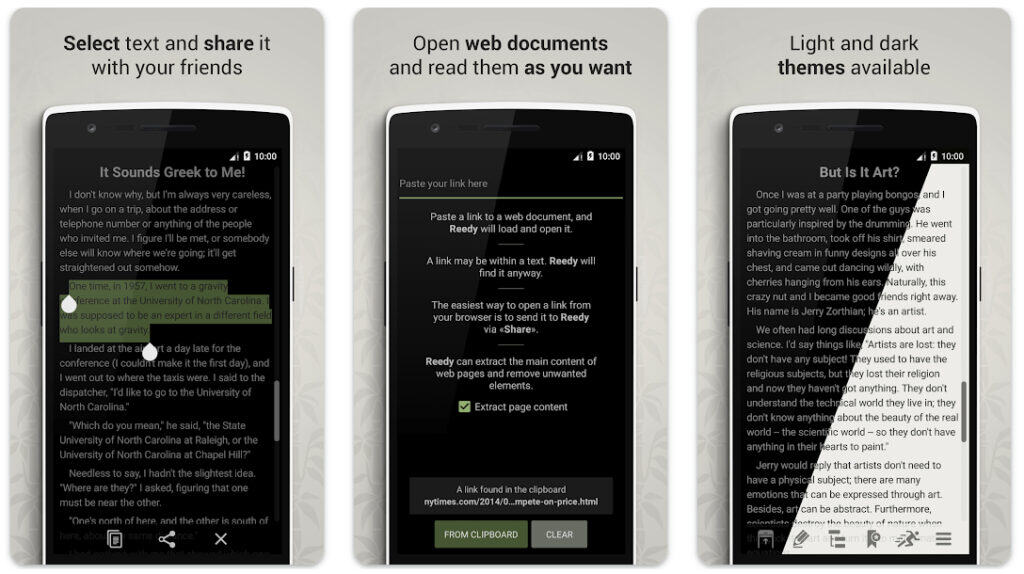
The clearest fit is for Android or Chrome users with a serious reading backlog. Articles, ebooks, newsletters, research notes — Reedy earns its place when volume is the problem. Students clearing dense reading lists and productivity-focused professionals are its natural audience.
A second group exists: people testing RSVP for the first time before committing to a premium platform. Reedy Intelligent Reader also works genuinely well as a teaching tool — helping beginners build reading pace and opening up text-heavy content to readers with learning disabilities. The free tier is substantial enough to evaluate all of this properly.
Those who it is not for deserve equal space. There is no iOS version. Is PDF your primary format? Reedy cannot help you. Building an AI-assisted reading workflow? You will hit its ceiling fast.
What Reedy Actually Does
1. The RSVP engine — where it earns its reputation
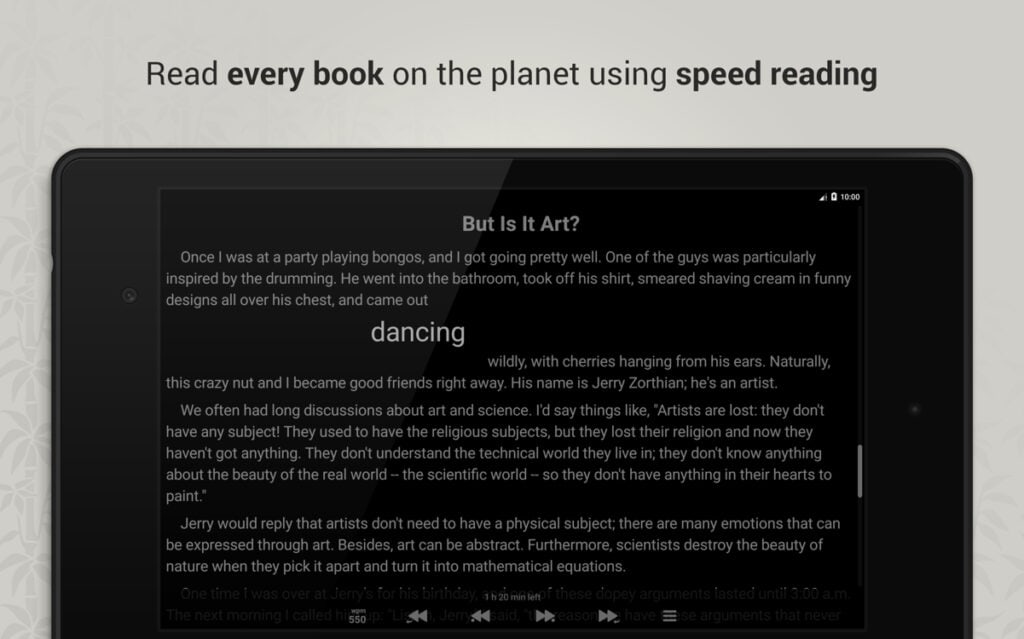
I came into this expecting a competent word-flasher. What I found is more considered. The speed range stretches to 3,000 WPM. That ceiling is not where anyone realistically reads. The 250–600 WPM middle range is where Reedy does its real work — and it handles that zone better than most alternatives at this price.
2. Focus mode and smart slowing
Focus mode shifts the anchor point toward each word’s beginning. Smart slowing automatically drops the pace at punctuation and with complex vocabulary. I use both. Together, they make sustained high-speed sessions noticeably less fatiguing — not a marketing claim, a felt difference.
3. Volume button controls
Hardware buttons control speed and playback entirely. No screen tapping required. That single detail keeps the reading flow intact in a way that touch controls never quite manage.
- Speed runs to 3,000 WPM with gradual acceleration available.
- Smart slowing adjusts automatically at punctuation and difficult words.
- Focus mode reduces per-word cognitive effort at higher speeds.
- Volume buttons handle playback and navigation fully hands-free.
4. Reading modes and display quality
Standard reading mode renders text, images, tables, links, and footnotes cleanly. During a speed reading pause, a full text preview appears immediately. I find this more useful than expected. Pausing mid-RSVP to scan a table without losing position is a small detail that can meaningfully change the experience.
Text-to-speech mode rounds out the three-mode structure. It runs on standard Android TTS engines — not AI voice synthesis. Quality depends on the voices installed on your device. Having regular reading, speed reading, and audio in one app is a genuine convenience. Dedicated RSVP tools rarely offer it.
Display customization covers font size, font type, background color, and text color. Day and night themes adjust screen brightness for comfort during long sessions. The interface is clean and intuitive. It is not design-forward, but it is consistently functional.
5. Content library and navigation
Bookmark system. Reedy keeps a full record of web pages, documents, and saved positions. Returning to exactly where you left off — or reviewing material already read — is built into the core interface. I use this regularly. It removes the low-level friction of tracking your own place.
Language support. The app runs in English, Spanish, German, Portuguese, Dutch, and Russian. That multilingual reach matters for non-English readers in a category where most RSVP tools are English-first.
6. Sources, formats, and ecosystem reach
Format and integration coverage. EPUB, FB2, TXT, and HTML are fully supported — including books compressed in ZIP archives. PDF is absent entirely. Web content arrives via browser share or through direct integrations with Pocket, Feedly, Evernote, Google Drive, and Dropbox.
The Chrome extension brings the Reedy Intelligent Reader to any Chromium browser on any desktop platform. This materially changes the platform availability story. Desktop Chrome users on any operating system have full access.
- Supported formats: EPUB, FB2, TXT, HTML — PDF is not supported.
- Integrates with Pocket, Feedly, Evernote, Google Drive, and Dropbox.
- Chrome extension adds desktop access on Windows, Mac, and Linux.
- Quote sharing with title and author attribution is built in.
- Multilingual interface: English, Spanish, German, Portuguese, Dutch, Russian.
Reading tip: If you want AI to actually save reading time, start with a focused overview instead of scattered tips. The main AI speed reading guide walks you through my 3‑Step AI Speed Reading Method and shows where tools, AI summaries, and listening apps realistically help.
From there, you can dive into tutorials on AI‑supported reading workflows such as our ChatGPT for speed reading guide — and compare carefully selected AI speed reading apps and text-to-speech apps or AI summarization tools before committing to any subscription.
Where Reedy Gets It Right
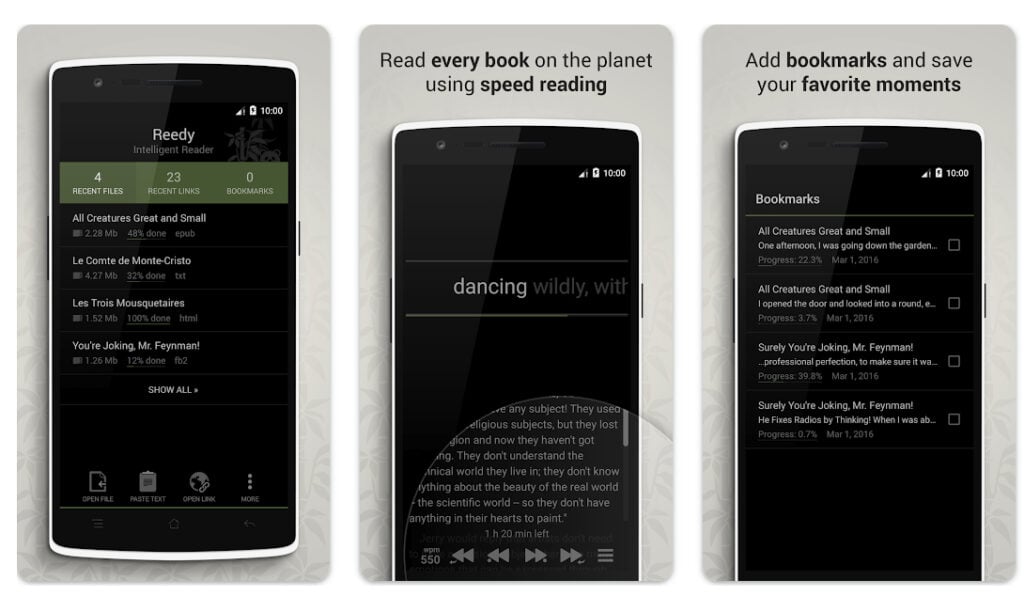
What I find most coherent about Reedy is its internal logic. Every feature points in the same direction: reduce friction, stay in the text, move faster. Smart slowing, focus mode, volume controls, full-text pause preview — all serve one goal. That kind of feature coherence is harder to achieve than it looks.
The one-time pricing deserves a direct statement. Reedy costs once and is yours permanently. In a market built on recurring billing, that distinction matters — especially for a focused tool with a defined purpose.
Active developer engagement is a real signal, too. Artem Krivolapov responds personally to Play Store reports. Bug fixes follow within days. For a solo-built app, that responsiveness tells you something about how seriously the product is maintained.
- The feature set coheres around one goal: faster, lower-friction reading.
- One-time purchase — no subscription, no annual renewal.
- Developer responds directly to user reports and addresses bugs quickly.
Where Reedy Has Its Problems
RSVP reading has a comprehension ceiling — and Reedy doesn’t address it
Research is consistent here. Processing text one word at a time makes it genuinely harder to retain the central theme of full sentences, paragraphs, and sections.
I noticed this myself at speeds above 400 WPM with dense material. Reedy does nothing to address it — no comprehension checks, no pacing feedback, no re-reading prompts. Readers who push speed without realizing their retention has dropped will get no signal from the app that this is happening.
PDF support does not exist
PDF is how academic papers, reports, and professional documentation actually arrive. Reedy does not support it — not imperfectly, not with limitations. It simply doesn’t. For students and knowledge workers, this is a structural gap that rules Reedy out as a primary reader.
The AI gap is widening, not holding
Reedy has no AI features whatsoever. No summarization, no key point extraction, no smart highlighting, no language model integration of any kind. I would not call that a design failure — Reedy’s identity does not require AI.
But Readwise Reader and Kognara now offer contextual AI assistance that actively helps readers prioritize and retain content. Reedy sits entirely outside that conversation. In 2026, that absence is no longer neutral. I have been saying that for a while now, that this is a widening competitive disadvantage.
What the Play Store Rating is Saying About Reedy
The current rating is 4.6 out of 5 across 100K+ reviews. Recurring complaints are specific: navigation bar conflicts on newer Android builds, paywalled article extraction failures, and TTS smart features partially broken in the most recent update.
The developer has acknowledged the TTS issue with a fix pending. The last significant update was in 2024, which is correct as of the time of this review. For a loyal user base, infrequent updates are becoming hard to ignore.
- RSVP reading has a known comprehension trade-off — Reedy offers no mitigation.
- PDF support is entirely absent — a significant omission for academic and professional users.
- No AI features of any kind; competitors have moved ahead in this area.
- Play Store rating sits at 4.6/5 — lower than the app’s reputation suggests.
- TTS smart features are limited in the latest version; the developer fix is pending.
- Infrequent updates.
Reading tip: Tools and apps are useful, but most lasting gains come from a few solid tutorials you revisit. If you suspect habits, not software, are holding you back, do this. Start with a fundamentals guide on how to speed read, then move into practical lessons on skimming and scanning, and reading word chunks.
Reedy App Pricing
Reedy uses a freemium model. The free tier covers core RSVP reading with limited customization. A one-time premium unlock opens the full feature set. Pricing varies by region — expect $2.99 to $4.99 per single purchase, verified at the time of writing. No subscription. No renewal billing.
For what Reedy delivers, the price is fair. The harder question is whether the feature set justifies the download at all — free or paid — given what competing tools now offer nearby.
Where Reedy Fits in an AI Speed Reading Workflow
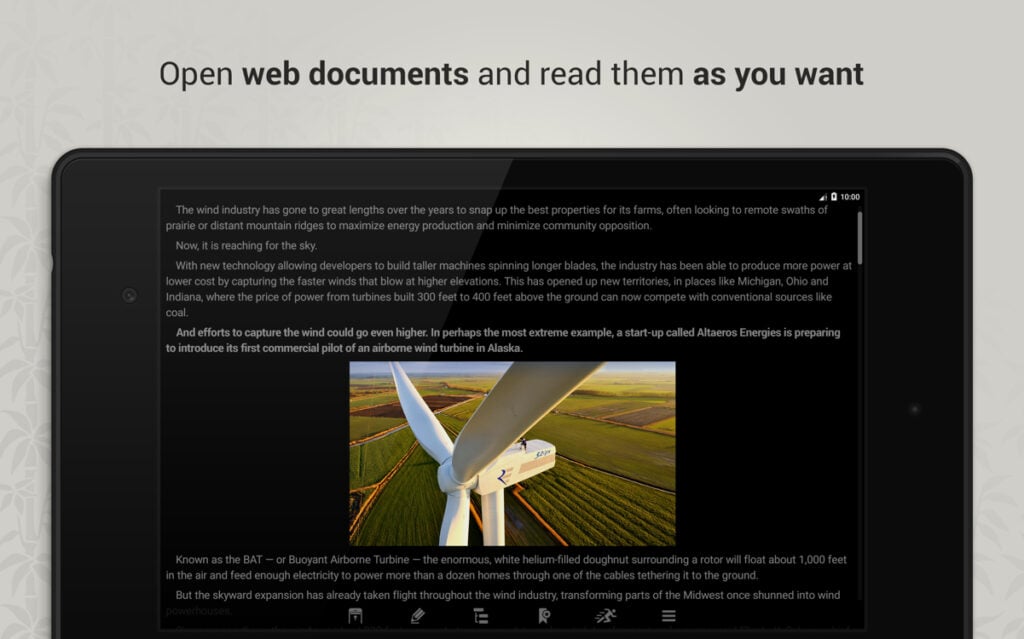
Within the 3-Step AI Speed Reading Method, Reedy belongs in Step 2 — the consumption phase. It handles mechanical speed reading. It does not preprocess, prioritize, or summarize. Those functions belong upstream, to AI tools like ChatGPT or Readwise.
A practical stack: run a document through an AI summarizer first. Identify the sections worth reading in full. Send that content to Reedy via Pocket or clipboard. Read at 350–500 WPM. Reedy handles one layer well. Intelligence lives elsewhere.
For how RSVP tools fit into broader reading systems, the speed reading apps guide covers the current landscape in full. If you are not bothered about technology at all, then an in-person or online speed reading class might be the better choice.
Reedy Review Verdict: Coherent, Honest, and Running Out of Road

Reedy earns a 6.5 out of 10. The RSVP engine is genuinely thoughtful. Focus mode, smart slowing, and volume controls are the details that separate a tool people keep from one they abandon after a week. The one-time pricing is fair. The Chrome extension adds desktop reach that most users never find.
However, it is difficult to understand why the average reader will want to process text one word at a time. It is just too easy to get completely lost in the nuances of the text, especially with long sentences and paragraphs. I tried it, but the app’s welcome in my digital world was very short-lived.
Nevertheless, don’t let that deter you from trying this tool if you see value in it. You can download the Reedy app for free on the Google Play Store and test various features. At some point, you will need to upgrade to use all its features. Without going premium, it will remain a limited service for sure.
Furthermore, what I cannot argue away is the direction of travel. A 4.6-star rating. No PDF support. No AI features in a category where AI has become expected. An update gap that reads as maintenance mode rather than active development. None of these is fatal alone. But together, they describe a tool holding its ground while the market moves around it.
My recommendation
My overall recommendation is to download Reedy if you are an Android or Chrome user committed to RSVP reading, want a stable one-time-purchase tool, and plan to pair it with AI tools for preprocessing. Skip it if PDF is your primary format, you use iOS, or you need AI-assisted reading within a single app.
For a more complete alternative, Speechify (view) covers text-to-speech with AI features across all platforms. For RSVP with broader format support, Spreeder remains a web-based option worth considering.
- Best for: Android and Chrome users wanting focused, affordable, ad-light RSVP reading.
- Skip if: PDF is your main format, you’re on iOS, or AI features matter to you.
- Final rating: 6.5/10 — coherent and honest, but increasingly outpaced.
Reedy at a Glance
| Category | Details |
|---|---|
| App Name | Reedy — Intelligent Reader |
| Developer | Artem Krivolapov (AZA Group) |
| Platform | Android + Chrome extension (Windows, Mac, Linux) |
| iOS Available? | No |
| Play Store Rating | 4.6/5 (4,670+ reviews) |
| Reading Modes | RSVP speed reading, regular reading, text-to-speech |
| Supported Formats | EPUB, FB2, TXT, HTML (PDF not supported) |
| Key Integrations | Pocket, Feedly, Evernote, Google Drive, Dropbox |
| Languages | English, Spanish, German, Portuguese, Dutch, Russian |
| AI Features? | None |
| Free Tier? | Yes — core RSVP with limited customization |
| Premium Price | ~$2.99–$4.99 (one-time, region-dependent) |
| Subscription Required? | No |
| Best For | Android RSVP readers, students, productivity users |
| Not For | iOS users, PDF-heavy readers, AI workflow builders |
| SPL Rating | 6.5/10 |
| Official Site | reedy-reader.com |
Interesting sources:
If you like to see what the evidence actually says about speed reading and reading tech, it’s worth dipping into original research rather than app marketing. These non‑commercial sources on RSVP reading, bionic reading, eye movements, regressions, comprehension, and retention are a solid starting point:
Curious what science says about RSVP, bionic reading, eye fixations, and regressions? These original studies and reviews are a good starting point:
- Modern Speed‑Reading Apps Do Not Foster Reading Comprehension (Rayner et al., 2016):
https://pubmed.ncbi.nlm.nih.gov/29461715/ - Perceptual Learning in an RSVP Reading Task (Chung, 2014):
https://pmc.ncbi.nlm.nih.gov/articles/PMC4274879/ - Guiding the Gaze: How Bionic Reading Influences Eye Movements (2025):
https://pmc.ncbi.nlm.nih.gov/articles/PMC12565662/ - Eye Movements and Fixation‑Related Potentials in Reading – Review (Schuster et al., 2020):
https://pmc.ncbi.nlm.nih.gov/articles/PMC7157570/ - A Cognitive Model of Regressive Eye Movements During Reading (von der Malsburg & Vasishth, 2020):
https://pmc.ncbi.nlm.nih.gov/articles/PMC7888242/
Have an opinion? Please share this post or your experience with the Reedy app or extension in the comments below.
Disclosure: This post contains affiliate links to some of our partners. Speed Reading Lounge may receive a commission for purchases made through these links. It does not add any extra costs. All reviews, opinions, descriptions, and comparisons expressed here are our own.