
Reading Trainer App Review
Reading Trainer: Better pace & retention – An app for iOS, Android

Fast reading apps tend to promise transformation. Download this app, train for ten minutes a day, and you’ll be reading twice as fast by next week.
Reading Trainer, developed by Hekua Apps, doesn’t quite make that pitch. I find that restraint either quietly admirable or quietly damning, depending on what you walked in expecting.
I’ve spent time with apps that drown you in features. Reading Trainer is not one of them. It occupies a specific, unglamorous corner of the reading app market: structured eye-training exercises, peripheral vision drills, and basic comprehension checks.
No AI. No content library. No ecosystem of overlapping features competing for your attention. Whether that simplicity feels like focus or neglect is a question our Reading Trainer review will answer directly.
By the end, you’ll know exactly what Reading Trainer does well, where it stalls, who should bother downloading it, and who should look elsewhere entirely.
What Is Reading Trainer?
Reading Trainer is a mobile speed reading training app built around visual exercises designed to improve reading speed and peripheral vision.
It’s available on iOS (App Store, rated 3.7 out of 5 from roughly 200+ ratings) and Android (Google Play, rated 3.4 out of 5 from over 1,000 reviews). Development comes from Hekua Apps, a small independent studio that has quietly kept the app alive for over a decade.
I’d personally position it firmly in the exercise-based training niche — not an RSVP reader, not a content platform, not an AI assistant. Think flashcard-style visual drills rather than a reading environment.
It’s a specialist tool in a market increasingly dominated by multi-feature platforms, and I think that specialization cuts both ways in ways worth unpacking.
Who Gets Real Value From Reading Trainer
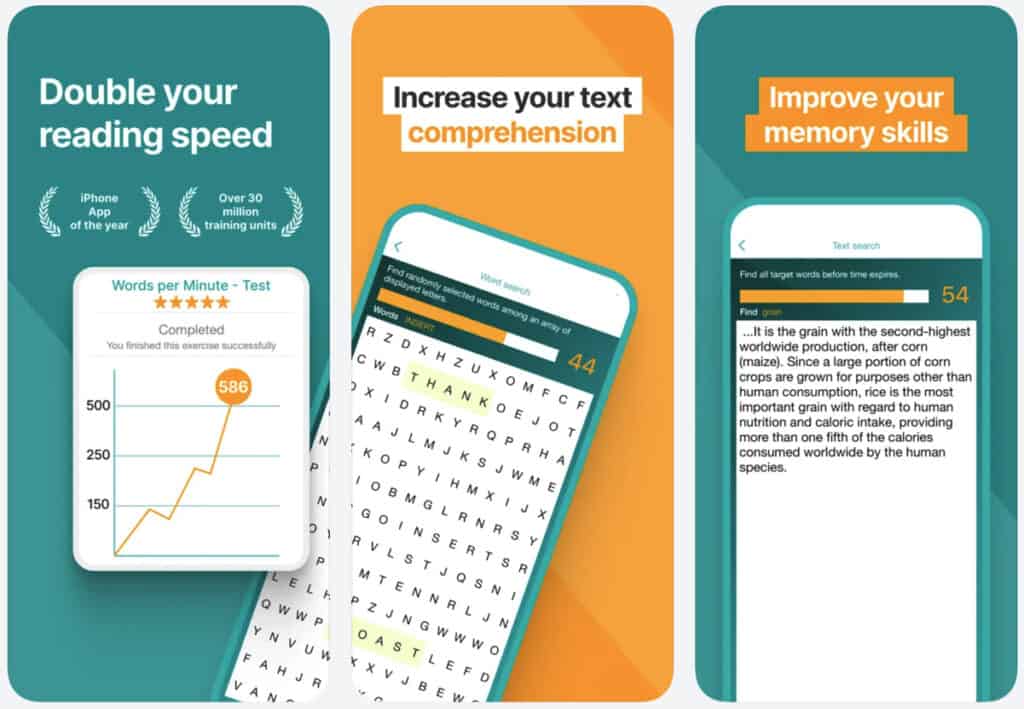
Beginners who want structured, daily reading exercises will find the most value here. If you’ve never done eye-movement training or peripheral vision work, I think the the Reading Trainer app introduces those concepts with low friction and a clear progression format that doesn’t overwhelm you on day one.
Students preparing for high-volume reading — exam season, academic research, dense textbooks — may also find the drills useful as a warm-up habit. The sessions are short, repeatable, and don’t require importing any content. This could be a real convenience for anyone who just wants to start drilling without setup friction.
Reading Trainer is not for anyone expecting an AI-powered reading assistant. It has no summarization, no adaptive learning, no text import for real documents. yet. That might change of course, or not. Please let me know if this info is outdated.
Furthermore, power readers, professionals who need to process PDFs or long-form articles, and anyone who wants a modern, content-integrated reading workflow will hit a ceiling almost immediately. I’d rather tell you that now than let you find out after downloading.
Reading tip: If you want AI to actually save reading time, start with a focused overview instead of scattered tips. The main AI speed reading guide walks you through my 3‑Step AI Speed Reading Method and shows where tools, AI summaries, and listening apps realistically help.
From there, you can dive into tutorials on AI‑supported reading workflows such as our ChatGPT for speed reading guide — and compare carefully selected AI speed reading apps and text-to-speech apps or AI summarization tools before committing to any subscription.
Inside Reading Trainer: Key Features Worth Knowing
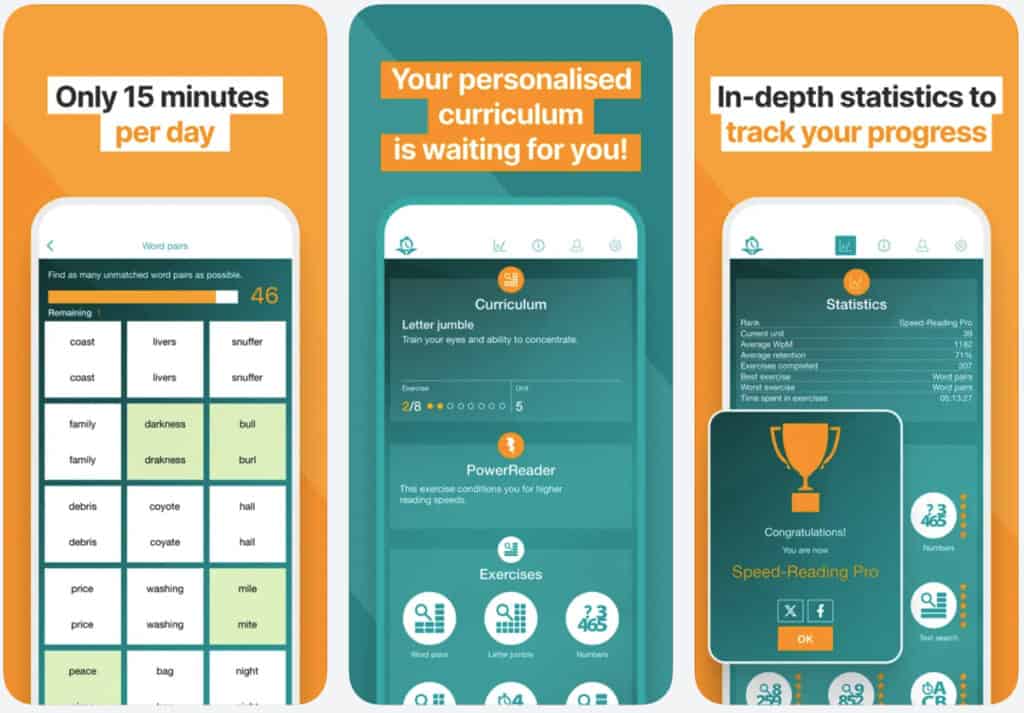
Eye Movement and Peripheral Vision Training
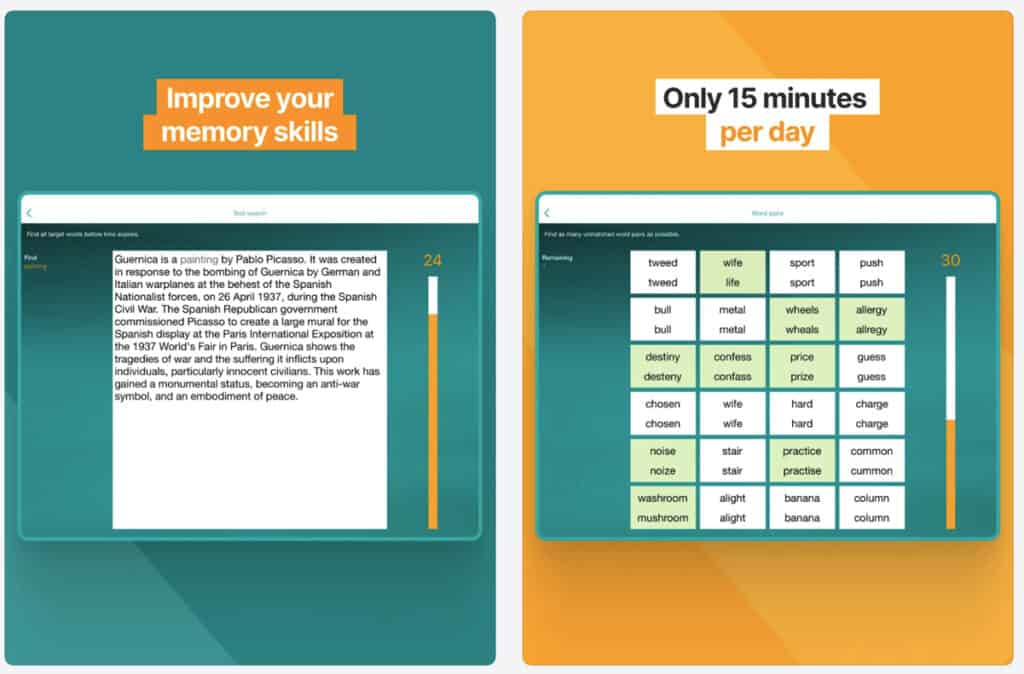
Core visual drills. The primary draw is a set of exercises targeting eye movement efficiency. These include peripheral vision expansion drills, where words or symbols appear at the edges of your field of view and you train yourself to register them without moving your eyes.
I find the underlying methodology credible — reducing unnecessary eye fixations is a real technique with real research behind it, not marketing fiction.
Word recognition speed. Flash-based exercises display words or short phrases for fractions of a second. The goal is to train your brain to process text faster at the word-recognition level.
But, I’ll admit the exercises feel mechanical. But I think that mechanicality is somewhat the point here — repetition over time is what builds the skill, not novelty.
Comprehension Checks and Progress Tracking
Basic comprehension tests. After reading exercises, Reading Trainer includes simple comprehension questions. These are rudimentary compared to what platforms like Spreeder or even Basmo offer.
On the other hand, I appreciate their presence. They at least acknowledge that speed without retention is a hollow metric, which many drill-only apps conveniently ignore.
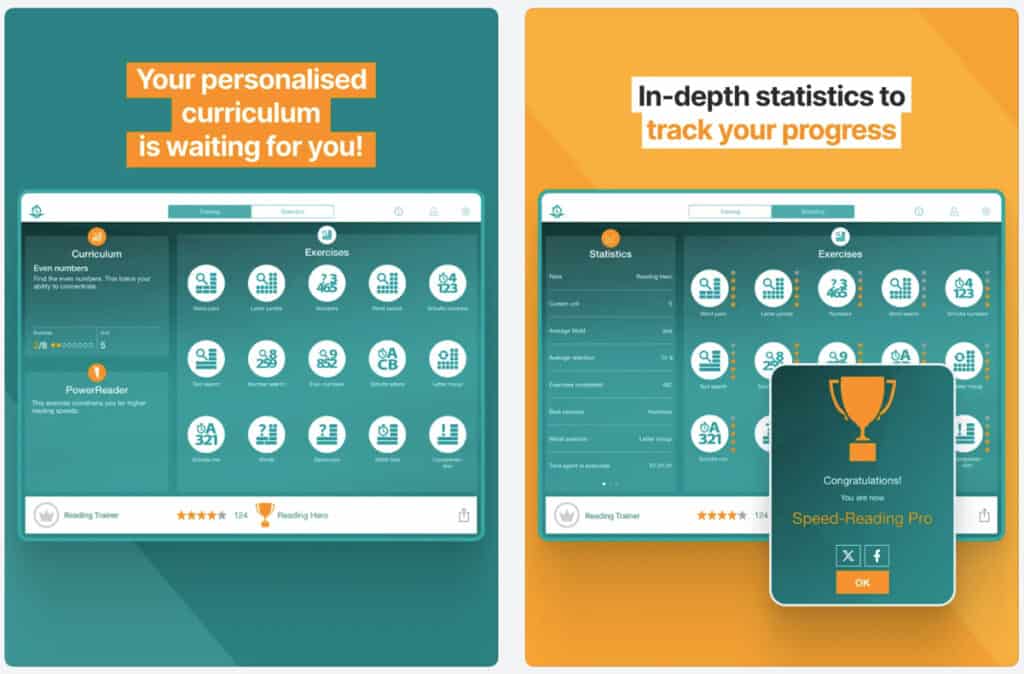
Progress tracking. Reading Trainer logs your speed measurements over sessions, giving you a rough visual record of improvement. The data is minimal — words per minute tracked across sessions, not broken down by comprehension accuracy or exercise type.
For a data-minded reader, I think this will feel thin. It tracks that you improved. It doesn’t tell you much about why or how.
Exercise Variety and Session Structure
Multiple training modes. The app also includes several distinct exercise types beyond simple RSVP flash reading. Schulte tables — grid-based exercises that train peripheral vision and attention — appear here alongside more conventional speed-reading drills.
I was glad to see them. Schulte tables are a genuine training method used in professional speed reading programs, and their inclusion gives the app more credibility than most casual reading apps bother to earn.
Short, self-contained sessions. Sessions run five to fifteen minutes depending on mode. For users building a habit, I think this is a real, underrated advantage. The app doesn’t demand long commitments, and the format fits naturally into small daily windows — a commute, a lunch break, five minutes before your first meeting.
Features in a nutshell:
- Peripheral vision drills are the strongest feature — genuinely useful for beginners.
- Schulte table training adds legitimate methodology beyond basic RSVP.
- Comprehension checks exist but offer minimal depth.
- Progress tracking is functional but won’t satisfy anyone who wants detailed analytics.
Reading tip: Tools and apps are useful, but most lasting gains come from a few solid tutorials you revisit. If you suspect habits, not software, are holding you back, do this. Start with a fundamentals guide on how to speed read, then move into practical lessons on skimming and scanning, and reading word chunks.
Where Reading Trainer Gets It Right
The peripheral vision and Schulte table exercises stand out. Not because they’re beautifully designed — I won’t pretend they are. But because they address something real.
Most reading apps focus exclusively on RSVP flash reading. Peripheral vision work is often skipped entirely, and its presence here gives Reading Trainer a legitimate training angle that competitors routinely overlook. That earns it genuine credit in my view.
The low-commitment session structure works in its favor too. Five minutes is enough to complete a meaningful drill. I find that for users who struggle to build consistent habits, a short daily session in this app is more sustainable than a twenty-minute course module on a competing platform. There’s less resistance to starting, and starting consistently is half the battle.
Pricing also deserves credit. For a free or low-cost app doing what it sets out to do, the value-to-cost ratio is reasonable — especially for students or casual users who aren’t ready to invest in a premium platform. I wouldn’t argue it overdelivers. But I also wouldn’t say you’re being short-changed for what you pay.
Pros in a nutshell
- Peripheral and Schulte table exercises are legitimately differentiated from typical speed reading apps.
- Short sessions support consistent daily practice without high commitment.
- Low cost makes it accessible for beginners testing the waters.
Where Reading Trainer Lets You Down
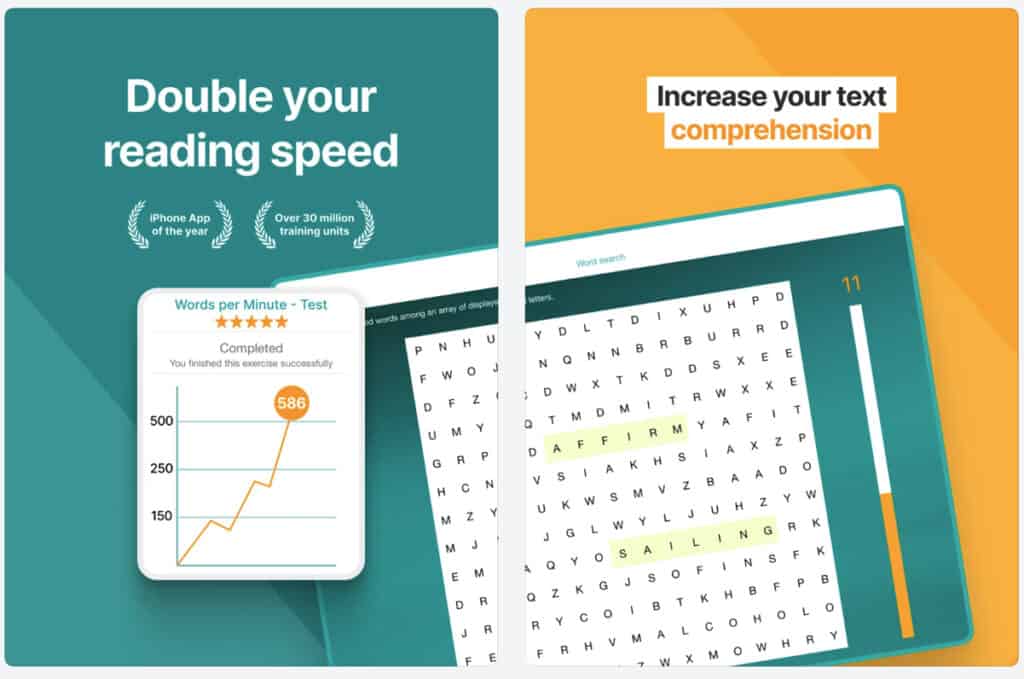
Reading Trainer has been around since the early 2010s, which is a long run for any mobile app. I’ll say this: it doesn’t look like a relic. The interface holds up reasonably well for what it is — a focused drill tool, not a design showcase.
What does show its age is the product thinking beneath the surface. The feature set hasn’t meaningfully evolved alongside the market, and that’s where the real friction starts.
Limited AI integration.
I’ll give credit where it’s due: a recent update on Android mentions new content “powered by advanced AI.” That’s a step forward worth acknowledging. But I find it thin.
There’s no summarization, no adaptive difficulty that meaningfully adjusts to your weaknesses, no content-aware pacing. One AI-assisted content layer in a changelog does not make this an intelligent app. The drills still feel static, and the gap between Reading Trainer and genuinely AI-driven reading tools remains wide.
Android experience is noticeably worse.
Google Play now shows 3.7 stars — but from nearly 20,000 reviews, which tells a fuller story than the older, smaller sample. Reviews consistently flag crashes, freezes, and UI inconsistencies on Android.
The iOS version runs more reliably. I’d go in with lowered expectations on Android, especially given that volume of documented frustration across that many users.
No real content integration.
You can’t import your own reading material, connect an RSS feed, or practice with actual text you need to read. Every exercise uses app-generated content, with one user review explicitly flagging this as a missing feature they wish existed.
That disconnect between training and real reading is the app’s most fundamental limitation in my view. Speed reading skills built in a controlled drill environment don’t always transfer cleanly to the documents you actually need to process — and that gap matters more the more serious a reader you are.
Cons in a nutshell:
- Dated UI creates friction before users even start training.
- AI involvement is minimal — one content layer does not make this an adaptive tool.
- Android version has a documented reliability problem across nearly 20,000 reviews.
- No way to practice with your own real-world reading material.
Pricing: What You Pay and What You Get
The one-time purchase framing I’ve seen in older reviews is no longer accurate, and that matters. Reading Trainer has moved to a subscription model. On iOS, Premium tiers currently run from $13.99 for a short-term plan up to $66.99–$69.99 for annual access.
There is a separate Synchronisation add-on priced between $6.99 and $32.99 depending on the plan. These are not pocket-change numbers for a drill-based training app with no content library.
I find this pricing hard to justify at the higher tiers. For $66.99 a year, I expect AI-driven personalization, real content integration, or at minimum a polished modern interface.
Reading Trainer delivers none of those things yet, but maybe soon. The lower entry-point plans feel more defensible for a beginner testing the waters, but the annual price puts it in direct competition with tools that offer significantly more. That comparison does not flatter it.
Always check current pricing in your local App Store or Play Store before committing, as tiers, regional pricing, and available plans shift regularly.
Pricing in a nutshell:
- Always verify live pricing before purchasing — the numbers in older reviews no longer apply.
- Subscription model replaces the old one-time purchase — pricing has changed significantly.
- Annual premium tiers up to $66.99–$69.99 are hard to justify against what the app currently delivers.
- A separate Synchronisation add-on adds further cost if you use multiple devices.
Availability: All systems, Windows, iOS, Android, Mac.
Pricing: $66.99/year.
Reviews: Based on user reviews the current rating is 4.5 out of 5.
Android: View in Play Store
for iOS: View in store.
How Reading Trainer Fits Into an AI Speed Reading Workflow
Reading Trainer occupies what I’d call the pre-workflow layer of the 3-Step AI Speed Reading Method. It’s not a tool I’d reach for to process a research paper or summarize a long report. I think of it as conditioning work — the kind of drilling you do before the main event, not during it.
In Step 1 of the method (Pre-Reading with AI), tools like ChatGPT or Claude help you orient yourself before engaging with a text. Reading Trainer doesn’t contribute there directly.
Where I see it fitting is as a separate daily habit that supports the visual mechanics behind faster reading. In other words, improving peripheral span and reducing fixation time so that, when I engage with an AI-assisted reading workflow, my eyes are already working more efficiently behind the scenes.
Paired with a more capable platform, e.g., Spreeder for RSVP practice on real content, or similar speed reading apps, Reading Trainer makes sense as a supplementary conditioning tool.
On its own and right now, it doesn’t constitute a full AI reading workflow. That’s an honest assessment of its place in a system, not a criticism of what it was built to do.
- Best used as supplementary conditioning, not as a primary reading tool.
- Supports the visual mechanics behind AI-assisted reading workflows.
- Combine with RSVP and AI summarization tools for a more complete system.
The Verdict: Is Reading Trainer Worth Your Time?
Reading Trainer scores a 5.5 out of 10. It does a specific thing reasonably well — peripheral vision and Schulte table training — and it does that thing at a price that removes the barrier to entry. For a beginner who wants to start somewhere concrete, I think it’s a valid starting point, and I mean that without irony.
The problem is that “starting point” is about all it offers. The interface hasn’t kept pace with the market. The Android version has reliability issues. There’s no AI, no content integration, no adaptive learning.
In a landscape where tools are getting genuinely smarter, I find Reading Trainer feels like it’s running on an older operating system — not just technically, but conceptually. That’s a hard thing to look past in 2026.
Download it if you’re a beginner building a daily reading habit and want structured eye-training exercises at minimal cost. Skip it if you’re looking for a modern, AI-integrated reading tool that connects to your actual reading workflow.
The gap between what this app offers and what you might actually need is worth being honest about before you commit.
For more capable alternatives, Spreeder offers RSVP practice with real content integration, and the full speed reading apps comparison will help you find a tool better matched to where you are right now.
Reading Trainer App: Quick Reference
| Category | Details |
|---|---|
| App Name | Reading Trainer |
| Developer | Hekua Apps |
| Platforms | iOS, Android |
| iOS Rating | 3.7 / 5 (200+ ratings) |
| Android Rating | 3.4 / 5 (1,000+ reviews) |
| Pricing | Free with one-time paid unlock (typically under $5 USD) |
| AI Features | None |
| Key Features | Peripheral vision drills, Schulte tables, RSVP flash reading, comprehension checks, progress tracking |
| Best For | Beginners building a visual training habit |
| Not For | Advanced readers, AI workflow users, Android-primary users |
| Overall Score | 5.5 / 10 |
Interesting sources:
If you like to see what the evidence actually says about speed reading and reading tech, it’s worth dipping into original research rather than app marketing. These non‑commercial sources on RSVP reading, bionic reading, eye movements, regressions, comprehension, and retention are a solid starting point:
Curious what science says about RSVP, bionic reading, eye fixations, and regressions? These original studies and reviews are a good starting point:
- Modern Speed‑Reading Apps Do Not Foster Reading Comprehension (Rayner et al., 2016):
https://pubmed.ncbi.nlm.nih.gov/29461715/ - Perceptual Learning in an RSVP Reading Task (Chung, 2014):
https://pmc.ncbi.nlm.nih.gov/articles/PMC4274879/ - Guiding the Gaze: How Bionic Reading Influences Eye Movements (2025):
https://pmc.ncbi.nlm.nih.gov/articles/PMC12565662/ - Eye Movements and Fixation‑Related Potentials in Reading – Review (Schuster et al., 2020):
https://pmc.ncbi.nlm.nih.gov/articles/PMC7157570/ - A Cognitive Model of Regressive Eye Movements During Reading (von der Malsburg & Vasishth, 2020):
https://pmc.ncbi.nlm.nih.gov/articles/PMC7888242/
What do you think? Please share your experience with the Reading Trainer app in the comments below.
Disclosure: This post contains affiliate links to some of our partners. Speed Reading Lounge may receive a commission for purchases made through these links. It does not add any extra costs. All reviews, opinions, descriptions, and comparisons expressed here are our own.